November 11, 2026, 6 min read, by the ReceiptQBO team
Docyt pricing for QuickBooks Online users and bookkeepers
Docyt does not publish prices. It quotes per property per month with unlimited users, on annual plans. The quote depends on property size, type and the modules you pick (Accounting, Payments, Business Intelligence). Docyt is built around hotels, restaurants and retail, and it runs its own books, so a QuickBooks Online practice is comparing two different kinds of product.
QuickBooks Online expense, ready to post
Confidence 93%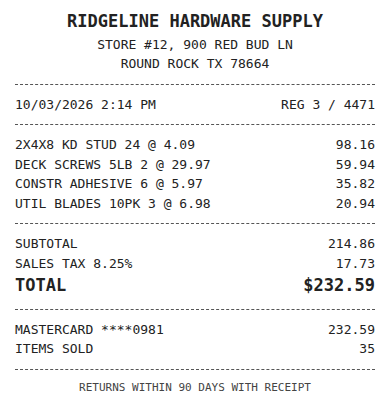
- Vendor
- Ridgeline Hardware Supply
- Date
- Oct 3, 2026
- Total
- $232.59
- Account
- Job Materials
- Class
- Field Ops
- Payment
- Card ending 0981

How much does Docyt cost?
Docyt's pricing page shows no dollar figures. Pricing is tied to the number of properties, not seats, so every team member can log in. Tiers on the page are Economy (motels and limited service), Select service, Full service and Management companies. Each is quoted after a conversation with sales, which Docyt says usually answers within a business day.
The quote covers the modules you choose. PMS, POS, payroll and bank integrations, onboarding and training are listed as included. Payments carry transaction fees for checks and ACH. Contracts are annual. We could not find a verified public number, so any price you see on a review site is a guess until Docyt writes it down for you.
Does Docyt work with QuickBooks Online?
Docyt is an accounting automation platform with its own bookkeeping layer. Its pricing page mentions data migration from QuickBooks during onboarding, not a live QuickBooks Online sync, so confirm with sales how a client who keeps QuickBooks as the ledger would be served.
If the client stays in QuickBooks Online, the practical question is different: what reads the receipts and bills, codes them to that company's accounts and posts them. That is the job ReceiptQBO does, and the comparison in our Dext alternative page follows the same logic.
Fwd: Your Lowe's receipt
Forwarded email, 2 min ago
IMG_4471.HEIC
Client link, 9 min ago
Invoice #88213 from Sunbelt Rentals
Gmail filter, 22 min ago
38 files from October folder
Batch upload, 1 hr ago
What does a QuickBooks practice pay for receipts instead?
ReceiptQBO Bookkeeper on yearly billing costs $149 x 12 = $1,788 a year for up to 25 client companies and 2,500 pooled documents a month. For a single company, ReceiptQBO Company on yearly billing is $24 x 12 = $288 a year.
A per-property quote cannot be set against that until you have it in writing. Ask for the price for one property and for 25, and whether the quote assumes you move the client's books out of QuickBooks. Then divide by 25. Teams that do this often track which rival tools change prices with a competitor monitor such as Rivalism, since vendors rarely announce a rise.
When is Docyt the right choice?
When the client is a hotel, restaurant or multi-location operator and you want one platform for payables, payments and reporting, with the books moving off QuickBooks. That is a different project from keeping a QuickBooks Online client and speeding up receipt entry. A single-location restaurant that only needs supplier invoices posted to QBO usually needs neither Docyt nor a full platform, as our MarginEdge alternative page explains. The same is true of Restaurant365, which also replaces the ledger; the Restaurant365 pricing guide runs the yearly numbers for one and two locations, and Toast restaurants paying per location for invoice automation can compare our xtraCHEF alternative.
For a QuickBooks practice, a flat plan per practice is easier to defend to the client. See the side-by-side math for other vendors: the Hubdoc pricing guide and the AutoEntry pricing guide. Docyt's own plans are on its pricing page.
Expense, ready to post
96%- Vendor
- Sunbelt Rentals
- Account
- 6600 Equipment Rental
- Class
- Field Ops
- Location
- Round Rock
- Project
- Lakeview Deck Project
- Billable
- Yes, to customer
What do you get for the money with a QuickBooks practice plan?
Each receipt is coded from the connected client company's own accounts, classes, locations and customers. Vendor rules per client override the AI, and the app looks for the matching bank or card transaction before posting. A match attaches to that transaction. An unmatched receipt creates an Expense or Bill with the image.
Preparers and Reviewers share one queue across companies, and missing-receipt reminders go to clients weekly. See how to match receipts to bank transactions.
Docyt and ReceiptQBO pricing basis
| Plan | Price in USD | Billing basis | QBO fit | Best for |
|---|---|---|---|---|
| Docyt | Not published, quote from sales | Per property per month, unlimited users, annual | Confirm with Docyt | Hotels, restaurants, retail, books moving off QuickBooks |
| ReceiptQBO Company | $49 monthly or $24 a month billed yearly | Per company, up to 5 team members | QBO coding and matching | One QBO company |
| ReceiptQBO Bookkeeper | $299 monthly or $149 a month billed yearly | Per practice, up to 25 companies | QBO coding, matching, shared review | QBO practices |
Docyt details come from its public pricing page and may change. Confirm with Docyt before buying.
Docyt pricing questions
How much is Docyt?
Docyt does not publish prices. It quotes per property per month with unlimited users, billed on annual plans.
Is Docyt free?
No. Docyt is sold by quote on annual plans, with no public free tier.
Does Docyt integrate with QuickBooks Online?
Its pricing page mentions migration from QuickBooks during onboarding. Ask sales how a client who stays on QuickBooks Online is supported.
Is ReceiptQBO cheaper than Docyt?
ReceiptQBO publishes its prices, $1,788 a year for up to 25 companies. A real comparison needs your written Docyt quote.
Does ReceiptQBO have a free trial?
The receipt reader at the top of this page works without an account, so you can read a real receipt before you subscribe.