November 18, 2026, 9 min read, by the ReceiptQBO team
Restaurant365 pricing and cost for small restaurants on QuickBooks Online
Restaurant365 no longer prints prices on its pricing page and asks for a custom quote, but third-party listings report about $435 to $469 per location a month for the Essential bundle and $635 to $689 for Professional, billed quarterly, plus an implementation fee. That is roughly $5,200 to $5,600 a year for one location before setup. Restaurant365 also brings its own general ledger, so for a small restaurant already on QuickBooks Online the real decision is whether to leave QuickBooks, not just which plan to buy.
QuickBooks Online expense, ready to post
Confidence 93%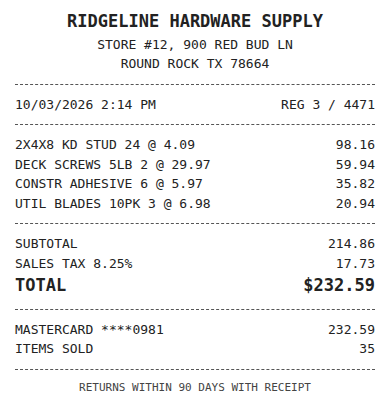
- Vendor
- Ridgeline Hardware Supply
- Date
- Oct 3, 2026
- Total
- $232.59
- Account
- Job Materials
- Class
- Field Ops
- Payment
- Card ending 0981

How much does Restaurant365 cost per month?
Restaurant365 prices per location and bills quarterly. Its own pricing page now lists modules (accounting, inventory and purchasing, workforce management, payroll and HR) and a "Get a Custom Quote" button, with no dollar figures. The numbers buyers see come from reviews and directories:
- Essential bundle: reported at $435 per location a month in older reviews and $469 in more recent listings, billed quarterly.
- Professional bundle: reported at $635 to $689 per location a month, billed quarterly, with some listings showing up to $749.
- Enterprise and franchise: custom quote.
- Implementation: a one-time fee that reviews mention but that Restaurant365 does not publish.
Treat those as a range for budgeting, not a quote. The bundle contents, the number of locations and the modules you add all move the price, and payroll is often priced separately. Get the quote in writing with the implementation fee, the minimum term and the quarterly invoice amount on it.
What does the quarterly bill look like for one and two locations?
Quarterly billing means the first invoice is three months of subscription at once, usually landing in the same month as the implementation fee. Using the reported ranges:
- One location, Essential: $435 to $469 a month, so $1,305 to $1,407 a quarter and $5,220 to $5,628 a year.
- One location, Professional: $635 to $689 a month, so $1,905 to $2,067 a quarter and $7,620 to $8,268 a year.
- Two locations, Essential: $10,440 to $11,256 a year.
- Two locations, Professional: $15,240 to $16,536 a year.
For a single restaurant doing $1.2 million in sales, Essential at the high end is about 0.47 percent of revenue. That can be a good deal if the software actually lowers food and labor cost. It is an expensive accounting system if the main thing it changes is where vendor invoices get entered.
Fwd: Your Lowe's receipt
Forwarded email, 2 min ago
IMG_4471.HEIC
Client link, 9 min ago
Invoice #88213 from Sunbelt Rentals
Gmail filter, 22 min ago
38 files from October folder
Batch upload, 1 hr ago
Does Restaurant365 replace QuickBooks?
Yes, in practice. Restaurant365 describes its accounting module as a restaurant-specific general ledger and chart of accounts with automated accounts payable. It is built to be the books, not to sit beside QuickBooks Online and send it entries. A restaurant that moves to Restaurant365 accounting is migrating its ledger: opening balances, vendor list, open bills, bank connections, and the way its accountant prepares the tax return.
That is the part the monthly price hides. Your bookkeeper and CPA may already know QuickBooks Online well and charge for the time it takes to learn a new system or to export data back out at year end. Ask them before you sign, because the switch changes their work as much as yours.
Restaurant groups with several locations, a controller and weekly inventory counts often find the single ledger worth it, because sales, labor, invoices and inventory reconcile in one place. A single café or a two-site neighborhood restaurant with an outside bookkeeper usually has less to gain.
Is Restaurant365 worth it for a small restaurant?
It is worth it when you will use the operations side every week. That means counting inventory on a schedule, building recipes so theoretical food cost means something, scheduling staff against a sales forecast, and reviewing a daily P&L. Those features are where the money comes back, and they are what the per-location price pays for.
It is usually not worth it when the honest list of problems is "invoices pile up, the bookkeeper keys them late, and the books are a month behind". That is a data entry problem. Moving the whole ledger to fix it trades a $5,000 to $8,000 yearly subscription and an implementation project for something a capture tool on top of QuickBooks Online fixes for a few hundred dollars a year.
A quick test: write down the three reports you would open every week in the new system. If you cannot name three, keep QuickBooks.
Expense, ready to post
96%- Vendor
- Sunbelt Rentals
- Account
- 6600 Equipment Rental
- Class
- Field Ops
- Location
- Round Rock
- Project
- Lakeview Deck Project
- Billable
- Yes, to customer
Worked example for one location that stays on QuickBooks Online
Take an independent Italian restaurant with 70 seats, one location, sales around $1.4 million a year, and an outside bookkeeper. Purchases come from a broadline distributor, a produce company, a meat purveyor, a dairy, a bakery, two wine and spirits distributors, and a linen service. That is about 140 to 180 vendor invoices a month, plus card receipts from the weekly restaurant supply run.
The owner was quoted Restaurant365 Essential. At the reported $469 a month, the first year costs $5,628 plus implementation. The alternative the bookkeeper proposed:
- Keep QuickBooks Online as the ledger, so no migration and no new system for the CPA.
- Add ReceiptQBO Company at $24 a month billed yearly, $288 a year, for 300 documents a month.
- Vendors email invoices to the restaurant's forwarding address. The manager photographs paper delivery tickets with a no-login upload link.
- Each invoice is read (vendor, invoice number, date, tax, total and line items), coded to the restaurant's cost of goods accounts by vendor rule, and posted to QuickBooks Online as a Bill with the image attached.
The difference is $5,340 in the first year before implementation, and the books stay where the CPA expects them. Food cost still shows on the monthly QBO profit and loss as a percentage of sales. What the restaurant gives up is daily food cost and recipe-level costing, which it was not planning to maintain.
The restaurant also imports a few products directly, olive oil and canned tomatoes from a producer in Italy. Those shipments bring a customs broker invoice and a duty bill, and the broker asks for an HS code per item; a lookup tool such as Tariffwise helps the owner answer that without guessing. The broker invoice then goes through the same forwarding address and posts as a Bill like any other vendor.
Restaurant365 compared with QuickBooks Online plus invoice capture
The table below puts the two setups side by side for one location. Restaurant365 figures are the reported ranges above. If you already pay for a restaurant back office tool only for invoice entry, our xtraCHEF alternative and MarginEdge alternative pages run the same math for those per-location prices.
Receipt
Ridgeline Hardware
Oct 3, $232.59
Card ending 0981
Bank line in QuickBooks
RIDGELINE HARDWARE #12
Oct 4, $232.59
Matched, 2 day window
What to ask before signing a Restaurant365 quote
- What is the implementation fee, and what does it include? Data migration, opening balances, bank feeds and training are often scoped separately.
- What is the minimum term? Quarterly billing does not always mean a quarterly commitment.
- Which modules are in the bundle? Payroll, scheduling and inventory can each change the number.
- How does my CPA get the data at year end? Ask for the export format and whether your accountant needs a seat.
- How are vendor invoices captured, and is there a per-invoice limit? If invoice capture is the main reason you are looking, compare it directly with a capture tool on your current ledger.
Keep the IRS recordkeeping guidance in mind whichever way you go: supporting documents such as invoices and receipts have to be kept and findable, and an image attached to each bill in the ledger is the simplest way to do that. For the accounts payable side in QuickBooks Online, see scanning bills into QuickBooks.
Restaurant365 and QuickBooks Online plus ReceiptQBO for one location
| Topic | Restaurant365 Essential | QuickBooks Online plus ReceiptQBO Company |
|---|---|---|
| Monthly software price | About $435 to $469 per location, reported | $24 billed yearly or $49 monthly, plus your existing QBO plan |
| First year subscription | About $5,220 to $5,628 | $288 billed yearly |
| Implementation | One-time fee, not published | Connect QBO and set vendor rules yourself |
| Billing | Quarterly | Monthly or yearly |
| General ledger | Restaurant365 replaces QuickBooks | Stays in QuickBooks Online |
| Vendor invoices | Automated AP inside Restaurant365 | Read, coded and posted as Bills with images |
| Inventory, recipes, scheduling | Yes | No |
| Best for | Multi-unit groups that manage food and labor weekly | Independent restaurants that need invoices in QBO |
Restaurant365 does not publish prices. Figures are third-party reports and vary by bundle and number of locations. All prices are USD. Get a written quote before buying.
Restaurant365 pricing questions
How much does Restaurant365 cost per month?
Restaurant365 asks for a custom quote. Third-party listings report about $435 to $469 per location a month for Essential and $635 to $689 for Professional, billed quarterly. An implementation fee is added on top, and payroll or extra modules can raise the price.
Does Restaurant365 integrate with QuickBooks Online?
Restaurant365 is built as its own restaurant general ledger with automated accounts payable, so it replaces QuickBooks rather than syncing into it. Restaurants that switch migrate their books. Ask Restaurant365 directly if you need data exported to an accountant who works in QuickBooks.
Is Restaurant365 too expensive for one restaurant?
It depends on use. At about $5,200 to $5,600 a year for Essential, it pays off when the owner counts inventory, costs recipes and schedules labor in it every week. If the main goal is getting invoices entered, keeping QuickBooks Online and adding invoice capture costs far less.
What is a cheaper alternative to Restaurant365 for invoices?
For a restaurant that stays on QuickBooks Online, ReceiptQBO Company reads vendor invoices, codes them by rule and posts them as Bills with images for $24 a month billed yearly. It does not do inventory, recipe costing or scheduling, so it fits restaurants that only need the accounting side.