
Why do small restaurants look for a MarginEdge alternative?
MarginEdge is built for operators who want to run food cost from one system. Invoices are photographed, digitized line by line, mapped to products, fed into inventory counts and recipe costs, and pushed to the accounting system with a daily controllable P&L on top. For a multi-unit group with a chef who actually counts inventory every week, that is the point of the product.
A single-location cafe or a 40 seat neighborhood restaurant often uses a fraction of it. The owner or the outside bookkeeper needs the Sysco, US Foods, produce, dairy, linen and liquor invoices in QuickBooks Online, coded to the right cost of goods accounts, with the image attached for the CPA. Inventory and recipe costing either never got set up or stopped after the first month. In that case the bill is $350 a month for what is, in practice, invoice entry.
That is the restaurant this page is for. If you use MarginEdge inventory and recipe tools every week, keep it.
How much does MarginEdge cost?
MarginEdge publishes its price on its pricing page: $350 per location per month for the full platform, billed monthly, or yearly at a 10 percent discount paid upfront. Add-ons are extra, such as the Freepour liquor scale at $150 per location a month and SmartPrep at $95. Onboarding fees and sales tax are not included in the listed price, and the page notes that annual plans are non-refundable if cancelled early. Restaurants on Toast also pay a pass-through API fee of 10 percent of the subscription per location, plus a $50 per location monthly fee billed by Toast.
The yearly math for one location:
- MarginEdge monthly: 12 x $350 = $4,200 a year.
- MarginEdge yearly with 10 percent off: $3,780 a year, before onboarding.
- On Toast, add $35 a month API fee and $50 a month suite fee: another $1,020 a year.
- ReceiptQBO Company yearly: 12 x $24 = $288 a year. Monthly: $49.
A single-location restaurant that only needs invoices in QuickBooks is comparing roughly $3,780 to $5,220 a year with $288 to $588.
Fwd: Your Lowe's receipt
Forwarded email, 2 min ago
IMG_4471.HEIC
Client link, 9 min ago
Invoice #88213 from Sunbelt Rentals
Gmail filter, 22 min ago
38 files from October folder
Batch upload, 1 hr ago
What does ReceiptQBO do with restaurant invoices?
Vendors email invoices to the restaurant's forwarding address, or the manager photographs paper delivery tickets with the no-login upload link on a phone. Each document is read: vendor, invoice date, subtotal, sales tax, total, currency and line items. A supplier invoice is recognized as a bill and posted to QuickBooks Online as a Bill with the image attached, so it lands in accounts payable instead of looking paid. A card receipt from a cash and carry run becomes an Expense, or attaches to the card charge that is already in the bank feed. The scanning bills into QuickBooks page shows the AP side in detail.
Coding uses the restaurant's own chart of accounts and classes. Vendor rules make it repeatable: "Sysco goes to Food Cost, US Foods goes to Food Cost, the linen company goes to Linen and Laundry, the distributor goes to Beer and Wine Cost". A rule always wins over the AI guess, and fixing one invoice in review can save a rule for the next one. Line items let a mixed invoice, say food plus paper goods, be split across two accounts.
Duplicate checks matter in a kitchen, where the driver leaves a paper copy and the vendor emails the same invoice that night. A document with the same vendor and amount within 3 days of another is held for review instead of posting twice.
What you give up compared with MarginEdge
Be clear about this before switching. ReceiptQBO does not do inventory counts, recipe or plate costing, menu engineering, theoretical against actual food cost, ingredient price alerts across vendors, POS integration, daily P&L or bill pay. It is not a restaurant management system. It reads invoices and receipts and puts them in QuickBooks Online correctly.
Food cost still works, just monthly instead of daily. With invoices coded to cost of goods accounts as they arrive, the QBO profit and loss shows food, beverage and paper cost as a percentage of sales when the month closes. Many independent owners already run on that number. If you need to know on Tuesday what last week's chicken cost per plate, MarginEdge or a similar tool earns its price.
ReceiptQBO supports QuickBooks Online only. There is no QuickBooks Desktop, no Xero and no Restaurant365 connection.
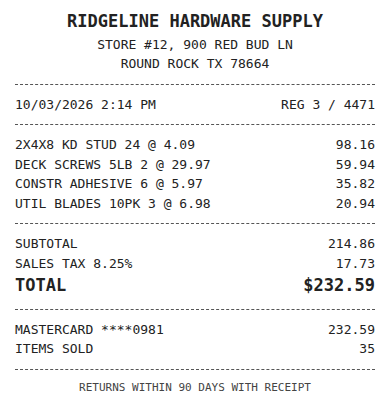
Receipt
Ridgeline Hardware
Oct 3, $232.59
Card ending 0981
Bank line in QuickBooks
RIDGELINE HARDWARE #12
Oct 4, $232.59
Matched, 2 day window
Worked example for a single-location cafe
Take a cafe with six regular vendors (broadline food, dairy, bakery, coffee roaster, produce, paper and chemicals) and about four deliveries a week between them, plus a weekly warehouse club run on the card. That is roughly 100 to 120 documents a month, comfortably inside the Company plan limit of 300 documents and 40 a day.
The monthly routine becomes: vendors email invoices to the forwarding address, the manager snaps any paper ticket on delivery, and the bookkeeper opens the review queue once a week. Clean invoices from known vendors post as Bills under their rules. The few with a low-confidence field (a smudged total, a new vendor) wait for one click. Card receipts attach to their charges in the bank feed. At month end the bookkeeper closes the books with every invoice already coded and every image attached.
The same cafe probably also depends on its website for online orders and catering inquiries. If that page goes down on a Friday night nobody notices until the orders stop, which is why some owners add a cheap uptime monitor such as Alertping next to their accounting stack.
Bookkeepers with several restaurant clients
Outside bookkeepers who look after five or ten independent restaurants hit the per-location price hardest, because each client pays it separately and most only use invoice capture. On ReceiptQBO Bookkeeper, $149 a month billed yearly covers up to 25 client QuickBooks Online companies and 2,500 pooled documents a month, with one review queue across all of them and weekly missing-receipt reminders to each owner. The receipt scanner for bookkeepers page covers the practice workflow, and matching receipts to bank transactions explains how card receipts link to feed lines.
If you are weighing broader bookkeeping platforms for hospitality clients, our Docyt pricing guide covers a tool aimed at hotels and restaurants, and the Dext alternative page compares the most common invoice capture tool in practices.
MarginEdge and ReceiptQBO side by side
| Topic | MarginEdge | ReceiptQBO |
|---|---|---|
| Price for one location | $350 a month, 10 percent off yearly, onboarding extra | $49 a month or $24 a month billed yearly |
| Yearly cost, one location | $3,780 to $4,200, plus Toast fees if on Toast | $288 to $588 |
| Invoice processing | Unlimited, line items mapped to products | 300 documents a month on Company, line items read |
| Posting to QuickBooks Online | Through its accounting integration | Bill or Expense with image, or attach to bank match |
| Inventory and recipe costing | Yes | No |
| POS integration and daily P&L | Yes | No |
| Bill pay | Yes, US only | No, pay bills in QuickBooks or your bank |
| Best for | Operators who manage food cost weekly | Small restaurants that need invoices in QBO |
MarginEdge prices come from its public pricing page. All prices are USD. Confirm current prices and fees before buying.
Move restaurant invoices from MarginEdge to ReceiptQBO
- Connect QuickBooks Online. Sign in with Intuit and sync the restaurant chart of accounts, classes and vendors.
- Point vendors to the new address. Ask each supplier to email invoices to the forwarding address, and give the manager the phone upload link for paper tickets.
- Set vendor rules. Map each regular supplier to its cost of goods or expense account once, then review the first week.