
Why QuickBooks Online users look for a Neat alternative
Many owners first met Neat through the desktop scanner. You fed paper receipts in at the end of the week, the software read them and you had a searchable archive instead of a shoebox. Neat has since moved to a cloud subscription, and receipts can also come in through its mobile app or a dedicated email address, according to independent reviews such as Business News Daily.
The questions start once the books live in QuickBooks Online. A filed receipt is not a booked expense. Someone still has to pick the right expense account, class and customer, and make sure the receipt does not create a second expense for a charge the bank feed already brought in. Reviews also flag that Neat connects to QuickBooks but not to other ledgers such as Xero, and that it does not offer month-to-month billing.
If your goal is clean books rather than a tidy archive, you want the tool to do the QuickBooks work too. That is what ReceiptQBO is built for, and how ReceiptQBO reads and posts receipts shows the full flow from upload to posted expense.
How much does Neat cost per year?
Neat costs $200 a year, per its public pricing page, which shows annual prices only and a free trial button. Two add-ons sit on top of that subscription: VIP Service for an extra $50 a year and Automated Insights for an extra $150 a year. Some third-party listings show different starting prices, so check Neat's own page before you decide.
For a single business with steady volume, $200 a year is a fair price for capture and filing. The math changes for a bookkeeper. If each client company needs its own Neat subscription, 25 clients cost about $5,000 a year before add-ons, and every subscription is another login to manage.
ReceiptQBO prices by QuickBooks Online company and pooled documents. The Company plan is $49 a month, or $24 a month billed yearly, for one company, 300 documents and up to 5 people forwarding receipts. The Bookkeeper plan covers up to 25 client companies and 2,500 documents pooled across them for $299 a month, or $149 a month billed yearly, which is about $1,788 a year for the whole practice. Every plan is on the ReceiptQBO pricing page.
Fwd: Your Lowe's receipt
Forwarded email, 2 min ago
IMG_4471.HEIC
Client link, 9 min ago
Invoice #88213 from Sunbelt Rentals
Gmail filter, 22 min ago
38 files from October folder
Batch upload, 1 hr ago
Does Neat work with QuickBooks Online?
Yes, Neat connects to QuickBooks, and reviewers describe sending expense data to QuickBooks with the receipt image attached. One Software Advice reviewer reported in 2024 that the QuickBooks Desktop connection was removed from their plan, so confirm with Neat which QuickBooks edition your plan supports today.
The difference with ReceiptQBO is how much of the QuickBooks work happens before a person looks at the receipt. ReceiptQBO signs in to each QuickBooks Online company through Intuit and syncs that company's expense accounts, classes, locations, customers and projects. Every receipt is coded to those exact lists, not to a generic category.
Vendor rules sit on top of the AI. A rule such as "Home Depot always Materials, class Field, billable to the job" wins every time, and one click turns a reviewer's correction into a rule for that company. Before posting, a duplicate check looks for the same file or the same vendor and amount within three days, and the receipt is matched by amount and date to bank or card transactions already in QuickBooks Online. The details are on matching receipts to bank transactions.
Who should stay on Neat
We would rather send you to the right tool than win a bad fit. Neat is the better choice in these honest cases.
- You mainly want a document archive. If the goal is a searchable place for receipts, contracts and tax papers, and someone else handles the books, Neat covers that broader filing job. ReceiptQBO focuses on receipts and vendor bills headed for QuickBooks Online.
- You are one business with low volume. At $200 a year, Neat costs less than the ReceiptQBO Company plan, which is $288 a year billed yearly.
- You already scan in batches on a desktop scanner and like it. ReceiptQBO accepts scanned PDFs and images too, but if the habit works and the books are fine, there is no reason to move.
- You file personal tax documents in the same place. ReceiptQBO is built for business books, not household paperwork.
If none of those describe you, the rest of this page is for you: a business or a practice where QuickBooks Online is the ledger and the real cost is the hours spent coding and matching receipts after they are scanned.
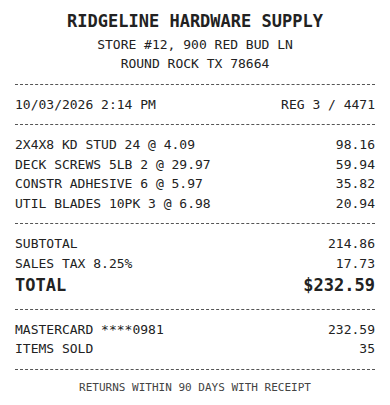
Receipt
Ridgeline Hardware
Oct 3, $232.59
Card ending 0981
Bank line in QuickBooks
RIDGELINE HARDWARE #12
Oct 4, $232.59
Matched, 2 day window
Who gains the most from switching to ReceiptQBO
Bookkeepers with ten or more QuickBooks Online clients. One review queue covers every client, sorted lowest confidence first, with a confidence threshold per client so clean receipts post on their own. Each client gets a forwarding address and a no-login upload link, and a weekly missing receipt reminder lists the card charges that still have no receipt. The receipt scanner for bookkeepers page covers the practice setup.
Owners whose receipts are mostly digital. Software subscriptions, fuel apps, supply orders and hotel folios arrive by email. Forward them, or set a rule that emails receipts to QuickBooks automatically, and they are read, coded and matched without anyone opening a scanner.
Teams with field staff on company cards. A crew member snaps the receipt in the phone browser before leaving the counter, and it is coded to the right job and class and matched to the card charge. Nothing to install on anyone's phone.
How to judge the switch in one month
Run your busiest QuickBooks Online company through ReceiptQBO for one month and keep three counts: how many receipts a person had to touch, how many posted twice or missed the bank match, and how many receipts were still missing at close. Multiply the minutes by what your time is worth. For most practices that number is bigger than the gap between any two subscriptions.
You can test it right now without an account. Upload one receipt at the top of this page and you will see the vendor, date, total and the QuickBooks Online account it would be coded to. If you are weighing other tools too, the Shoeboxed alternative page compares the other big paper-first service, and the best receipt scanner apps for QuickBooks Online guide lays out the field.
Neat and ReceiptQBO side by side
| Topic | Neat (per its public pages and reviews) | ReceiptQBO |
|---|---|---|
| Price | $200 a year, annual billing on the pricing page | $49 a month, or $24 a month billed yearly |
| Add-ons | VIP Service +$50 a year, Automated Insights +$150 a year | None, features included by plan |
| Capture | Mobile app, email address, desktop scanner | Phone browser link, email forwarding, upload up to 200 files |
| Ledgers | QuickBooks, reviews report no Xero | QuickBooks Online only |
| Coding target | Expense categories, then sent to QuickBooks | Your account, class, location, customer or project, billable flag |
| Bank and card matching | Check their current documentation | Matches to transactions already in QuickBooks Online |
| Multi-client practice | Subscription per business | Up to 25 or 100 client companies on one plan, one review queue |
| Best fit | One business that wants a searchable document archive | QuickBooks Online businesses and bookkeepers who want receipts booked |
Neat prices are from its public US pricing page in US dollars, checked October 2026, and can change. Check the vendor's own site before you decide.
How to move from Neat to ReceiptQBO
- Connect the QuickBooks Online company. Sign in through Intuit so the company's accounts, classes, locations, customers and projects sync before the first receipt arrives.
- Turn your Neat categories into vendor rules. Write rules for the ten vendors you buy from most, so fuel, software and materials land on the same accounts every time.
- Point receipts to the new address. Swap the Neat email address in vendor accounts and inbox filters for the ReceiptQBO forwarding address, and share the phone upload link with your team.
- Import a recent bank file. Upload a CSV, OFX, QFX or QBO Web Connect file so new receipts match charges already in QuickBooks instead of duplicating them.
- Export the Neat archive before renewal. Download your stored documents for your records, then let the annual Neat plan lapse once a full month has run through ReceiptQBO.