
Why QuickBooks Online practices look for an AutoEntry alternative
AutoEntry is a solid data capture product. Per its public pages, it is part of Sage, it works with Sage, Xero, QuickBooks and several smaller ledgers, and it charges in credits. One credit covers a receipt or an invoice, two credits cover an invoice with line items, and a page of bank statement costs three. That model is easy to understand when volume is small and steady.
It gets harder to plan when a practice grows. Receipts arrive in waves around month end and tax season. A client who switches to itemized supplier invoices doubles the credit cost of the same pile of paper. And because the product serves many ledgers, the coding screen has to stay generic enough for all of them.
The practices that move to ReceiptQBO usually say the same thing: every client is on QuickBooks Online, so they want a tool that thinks only in QuickBooks Online terms and a bill that does not change with the shape of each document. If you are new to the product, the short version is on how ReceiptQBO reads and posts receipts.
How much does AutoEntry cost?
AutoEntry costs from $13 a month for 50 credits on its Bronze plan, per its public US pricing page, excluding tax. Larger bundles bring the price per credit down: Silver is $24 for 100 credits, Gold $46 for 200, Platinum $103 for 500, Diamond $298 for 1,500 and Sapphire $469 for 2,500. Every plan includes unlimited users, unused credits carry over for up to 90 days, and plans can be paused or downgraded.
The catch is that a credit is not a document. Here is what the same 2,500 documents a month cost in credits, depending on what they are:
- All plain receipts and invoices. 2,500 credits, which fits the Sapphire plan at $469 a month.
- Half of the invoices need line items. 3,750 credits, which is above the largest published plan, so AutoEntry asks you to book a demo for a custom package.
- Plus 100 pages of bank statements. Another 300 credits on top.
ReceiptQBO counts documents, not credits. The Bookkeeper plan includes 2,500 documents a month pooled across up to 25 client companies for $299 a month, or $149 a month billed yearly. A receipt with twelve line items counts as one document. The Firm plan covers up to 100 companies and 10,000 documents for $899 a month, or $449 billed yearly. Full details are on the pricing page.
Fwd: Your Lowe's receipt
Forwarded email, 2 min ago
IMG_4471.HEIC
Client link, 9 min ago
Invoice #88213 from Sunbelt Rentals
Gmail filter, 22 min ago
38 files from October folder
Batch upload, 1 hr ago
Who should stay on AutoEntry
We would rather lose a sale than move you to the wrong tool. AutoEntry is the better fit in several honest cases.
- Your clients are on Sage or Xero. ReceiptQBO posts only to QuickBooks Online. If a large part of your book is on another ledger, one capture tool for everything will save more time than a specialist for one of them.
- You need PDF bank statement extraction. AutoEntry reads bank and credit card statement pages into transactions. ReceiptQBO imports bank files (CSV, OFX, QFX and QBO Web Connect) for matching, but it does not turn PDF statements into transactions.
- Volume is tiny. A single company with 40 receipts a month pays $13 on AutoEntry Bronze. Our Company plan is $49 a month, or $24 billed yearly, with 300 documents. At that size, AutoEntry is cheaper.
- You rely on purchase order matching or sales invoices. AutoEntry lists purchase order matching for QuickBooks and Xero and handles sales invoices. ReceiptQBO focuses on receipts and vendor bills.
If none of those describe you, read on. The rest of this page is for the practice where QuickBooks Online is the ledger for every client and receipts arrive in volume.
Who gains the most from switching to ReceiptQBO
The practice that gains the most looks like this: two to fifteen people, twenty to a hundred client companies, all of them on QuickBooks Online, and a lot of small receipts from fuel, meals, materials and software. For that practice, three things change.
- Coding uses the client's real QuickBooks lists. Each company's expense accounts, classes, locations and customers or projects sync from QuickBooks Online. A receipt can land on account, class, location, project and billable flag in one pass, which matters for job costing and for clients who report by location.
- Uncertain items are the only ones a person touches. Every field gets a confidence score, and each client has a threshold, 90 percent by default. Items at or above it post on their own. The rest wait in one review queue across all clients, lowest confidence first.
- Missing receipts chase themselves. Bank and card lines with no receipt form a list per client, and a weekly email asks the client for them with a no-login upload link. The details are on missing receipt reminders.
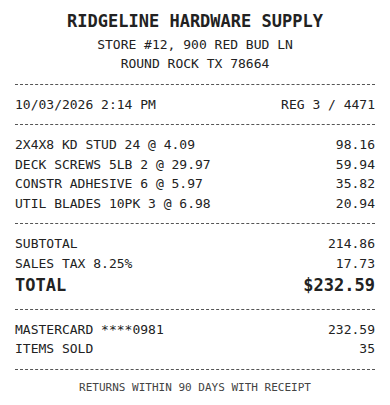
Receipt
Ridgeline Hardware
Oct 3, $232.59
Card ending 0981
Bank line in QuickBooks
RIDGELINE HARDWARE #12
Oct 4, $232.59
Matched, 2 day window
How intake, coding and posting compare day to day
Both tools accept documents by email, upload and mobile capture. The differences show up after a document arrives.
In ReceiptQBO, each client company gets its own forwarding address. Uploads take JPG, PNG, HEIC and PDF, one file at a time or in batches of up to 200. Email receipts with no attachment, such as app store, ride service and online order emails, are read from the email body. A Gmail or Google Workspace filter can forward a client's receipts automatically, which the email receipts to QuickBooks page walks through.
The AI reads vendor, date, subtotal, sales tax, tip, total, payment method, card last four digits and line items. Vendor rules then override the AI. A rule like "Home Depot always Job Materials, class Field, billable" wins every time, and when a reviewer corrects a field, one click turns the fix into a rule for that client.
Before anything posts, a duplicate check looks for the same file fingerprint, or the same vendor and amount within three days. Then the receipt is matched by amount and date to bank or card transactions already in QuickBooks Online. A match is attached to the existing transaction instead of creating a second expense, which is the most common way receipt tools double count spending. More on that on matching receipts to bank transactions.
What it costs your practice in time, not only in dollars
Subscription price is the smaller part of the bill. A bookkeeper billing $60 an hour who spends ten minutes fixing each uncertain receipt loses more money in a week than either tool costs in a month. So compare the two on the work that is left after the capture is done.
Run one real client through both tools for a month. Pick the client with the messiest receipts, not the cleanest. Then count three things: how many items needed a person, how many were posted twice or not matched to the bank line, and how many receipts were still missing at close. Those three numbers tell you more than any feature list, including ours.
Anyone can try one receipt on this page without an account and see the vendor, date, total and proposed QuickBooks Online account. Every plan is a paid subscription you can cancel any time. If you are also weighing Dext, the Dext pricing guide for QuickBooks bookkeepers lays out its plans the same way.
AutoEntry and ReceiptQBO side by side
| Topic | AutoEntry (per its public pages) | ReceiptQBO |
|---|---|---|
| Owner | Sage | Independent, QuickBooks Online only |
| Ledgers | Sage, Xero, QuickBooks, FreeAgent and others | QuickBooks Online only |
| How it is priced | Monthly credits, from $13 for 50 to $469 for 2,500 | Pooled documents, $299 for 25 companies and 2,500 documents |
| Line items | Invoices with line items cost 2 credits | Included, one document is one document |
| PDF bank statement extraction | Yes, 3 credits per page | No, imports CSV, OFX, QFX and QBO files for matching |
| Coding target | Supplier and category suggestions, custom rules | Account, class, location, customer or project, billable flag |
| Review across clients | Check their current documentation | One queue across all clients, lowest confidence first |
| Missing receipt chasing | Check their current documentation | Weekly client email with a no-login upload link |
| Best fit | Practices on several ledgers, low volume companies | Practices where every client runs QuickBooks Online |
AutoEntry prices are from its public US pricing page, in US dollars excluding tax, and can change. Check the vendor's own site before you decide.
How to move QuickBooks Online clients off AutoEntry
- Connect your busiest client first. Sign in to that client's QuickBooks Online company through the Intuit sign-in so accounts, classes, locations and customers sync.
- Copy your supplier rules across. Rebuild the AutoEntry supplier rules you rely on as vendor rules, starting with fuel, software, rent and the top ten suppliers by count.
- Switch the forwarding address. Give the client their ReceiptQBO address and change any email filter that forwarded to AutoEntry.
- Import a recent bank file. Upload a CSV, OFX, QFX or QBO Web Connect file so receipts match to bank lines already in QuickBooks instead of duplicating them.
- Pause, then downgrade. AutoEntry lets you pause or downgrade a plan, so keep history there for a month while new documents flow into ReceiptQBO, then move the next group.