
Why QuickBooks Online users look for a Shoeboxed alternative
Shoeboxed made its name with the Magic Envelope. You stuff paper receipts into a prepaid envelope, mail it, and the team scans them, checks the data and files the images in your account. For a business drowning in paper, that is a genuinely useful service, and it has been around for well over a decade.
The friction shows up later, inside QuickBooks Online. Shoeboxed sorts receipts into its own set of tax categories, and the QuickBooks Online integration is only included from the Pro plan up, per its public pricing page. Bookkeepers then still have to make sure each expense lands on the right account, class and customer, and that a receipt does not create a second expense for a charge the bank feed already brought in.
Most receipts today also never touch paper. Fuel apps, software subscriptions, supply orders and hotel folios arrive by email. When that is the bulk of your volume, paying for envelope processing makes less sense than a tool that reads email and phone photos and then does the QuickBooks work. That is the gap ReceiptQBO fills, and how ReceiptQBO reads and posts receipts walks through the whole flow.
How much does Shoeboxed cost per month?
Shoeboxed costs from $9 a month on its Starter plan, or $97 a year, per its public US pricing page. Starter covers 50 digital scans a month, 20 paper scans a year, 3 users and one Magic Envelope a year, but it does not list the QuickBooks Online integration. QuickBooks Online sync starts on Pro.
- Pro is $29 a month or $297 a year. It includes 250 digital scans and 50 paper scans a month, 5 users, one envelope a quarter and QuickBooks Online.
- Plus is $79 a month or $797 a year, with 1,000 digital and 150 paper scans a month, 10 users and an envelope every month.
- Paper Plus is $179 a month or $1,997 a year, with 5,000 digital and 300 paper scans a month and two envelopes a month.
Above the allowance, extra digital scans cost $0.07 to $0.19 each and extra paper scans $0.77 to $2.00 each depending on the plan, and extra envelopes are $9. Those plans are priced per account, so check with Shoeboxed how it bills a practice that manages many separate client companies.
ReceiptQBO prices by QuickBooks Online company and pooled documents. The Company plan is $49 a month, or $24 a month billed yearly, for one company, 300 documents and up to 5 people forwarding receipts. The Bookkeeper plan covers up to 25 client companies and 2,500 documents pooled across them for $299 a month, or $149 billed yearly. Every plan is on the ReceiptQBO pricing page.
Fwd: Your Lowe's receipt
Forwarded email, 2 min ago
IMG_4471.HEIC
Client link, 9 min ago
Invoice #88213 from Sunbelt Rentals
Gmail filter, 22 min ago
38 files from October folder
Batch upload, 1 hr ago
Does Shoeboxed integrate with QuickBooks?
Yes, Shoeboxed integrates with QuickBooks Online on its Pro, Plus and Paper Plus plans, per its pricing page, and not on Starter. The difference with ReceiptQBO is depth. ReceiptQBO signs in to each QuickBooks Online company through Intuit, syncs that company's expense accounts, classes, locations, customers and projects, and codes every receipt to those exact lists.
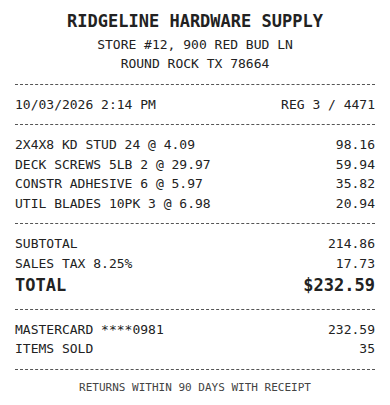
Vendor rules sit on top of the AI. A rule such as "Shell always Fuel, class Field, billable to the job" wins every time, and when a reviewer corrects a field, one click turns the correction into a rule for that company. Before posting, a duplicate check looks for the same file or the same vendor and amount within three days, and the receipt is matched by amount and date to bank or card transactions already in QuickBooks Online. A match is attached to the existing transaction instead of creating a new expense. The details are on matching receipts to bank transactions.
Who should stay on Shoeboxed
We would rather point you to the right tool than win a bad fit. Shoeboxed is the better choice in these honest cases.
- You have boxes of paper and no time to photograph them. The Magic Envelope is the whole point of Shoeboxed. ReceiptQBO has no mail-in service, so every receipt has to be photographed, scanned or forwarded by someone on your side.
- You track mileage in the same app. Shoeboxed lists unlimited mileage tracking on every plan. ReceiptQBO does not track mileage.
- Your volume is tiny and you do not need QuickBooks sync. Shoeboxed Starter at $9 a month is cheaper than any ReceiptQBO plan.
- Your books are in Xero. Shoeboxed lists Xero among its integrations. ReceiptQBO posts only to QuickBooks Online.
- You also want business cards scanned. That is outside what ReceiptQBO does.
If none of those describe you, the rest of this page is for you: a business or a practice where QuickBooks Online is the ledger and most receipts already arrive by email or phone.
Receipt
Ridgeline Hardware
Oct 3, $232.59
Card ending 0981
Bank line in QuickBooks
RIDGELINE HARDWARE #12
Oct 4, $232.59
Matched, 2 day window
Who gains the most from switching to ReceiptQBO
Two kinds of buyers get the most out of the move.
Bookkeepers and small firms. A practice running ten to a hundred QuickBooks Online clients gets one review queue across every client, sorted lowest confidence first, with a threshold per client so clean receipts post on their own. Each client gets a forwarding address and a no-login upload link, and a weekly missing receipt reminder lists the card charges that still have no receipt. The receipt scanner for bookkeepers page covers the practice setup.
Owners with crews or field staff. A contractor, agency or property business where five people buy things on company cards needs receipts coded to the right job and class, not to a generic tax category. Crew members snap the receipt in the phone browser before they leave the counter, and it is coded, matched to the card charge and posted. Nothing to install, and nothing to mail.
What to compare during a trial month
Feature lists only go so far. The fair test is one real month on your messiest QuickBooks Online company. Count three things in each tool: how many receipts a person had to touch, how many posted twice or missed the bank match, and how many receipts were still missing at close. Multiply the minutes by your hourly rate. That number usually outweighs the subscription difference.
You can start right now without an account. Upload one receipt at the top of this page and you will see the vendor, date, total and the QuickBooks Online account it would be coded to. If you are weighing other tools at the same time, the best receipt scanner apps for QuickBooks Online guide lays out the main options side by side.
Shoeboxed and ReceiptQBO side by side
| Topic | Shoeboxed (per its public pages) | ReceiptQBO |
|---|---|---|
| Entry price | $9 a month (Starter), no QuickBooks Online sync | $49 a month or $24 billed yearly, QuickBooks Online included |
| Price with QuickBooks Online | From $29 a month (Pro), 250 digital scans | $49 a month (Company), 300 documents |
| Paper mail-in service | Yes, Magic Envelope, frequency by plan | No, photo, scan, upload or email forwarding |
| Ledgers | QuickBooks Online and Xero on paid tiers | QuickBooks Online only |
| Coding target | Its own expense categories | Your account, class, location, customer or project, billable flag |
| Bank and card matching | Check their current documentation | Matches to transactions already in QuickBooks Online |
| Multi-client practice tools | Priced per account | Up to 25 or 100 client companies on one plan, one review queue |
| Mileage tracking | Yes, unlimited | No |
| Best fit | Paper-heavy businesses, mileage in one app | QuickBooks Online businesses and practices with digital receipts |
Shoeboxed prices are from its public US pricing page in US dollars and can change. Check the vendor's own site before you decide.
How to move from Shoeboxed to ReceiptQBO
- Connect the QuickBooks Online company. Sign in through Intuit so the company's accounts, classes, locations, customers and projects sync before the first receipt arrives.
- Write rules for your top vendors. Turn the categories you used in Shoeboxed into vendor rules for the ten vendors you buy from most, such as fuel, software and materials.
- Redirect the inbox. Point any email filter or receipt address that fed Shoeboxed to the company forwarding address in ReceiptQBO, and share the phone upload link with your team.
- Import a recent bank file. Upload a CSV, OFX, QFX or QBO Web Connect file so new receipts match charges already in QuickBooks instead of duplicating them.
- Keep the archive, then downgrade. Download your Shoeboxed history for your records, then move to a smaller plan or cancel once a full month has run through ReceiptQBO.