
Who should look for an xtraCHEF alternative?
xtraCHEF by Toast is a back of house tool. On the Pro tier it does inventory counts and recipe costing on top of invoice processing, and it lives inside the Toast platform, so sales, labor and invoice data sit next to each other. For a kitchen manager who builds plate costs and counts the walk-in every Sunday, that combination is the reason to pay.
Plenty of Toast restaurants never get that far. They were sold Essentials during a POS rollout, someone set up the accounting sync, and today the only thing the product really does for them is turn a stack of Sysco, US Foods, produce, bakery and beer distributor invoices into entries in QuickBooks Online. The kitchen does not open it. The bookkeeper does.
If that describes your restaurant, you are paying a per location price for invoice entry. This page is for that owner, and for the outside bookkeeper who looks after several of them. If your chef lives in xtraCHEF recipe costing every week, stay where you are.
How much does xtraCHEF cost?
Toast publishes two xtraCHEF tiers in its help center article on requesting an xtraCHEF demo. Essentials is $179 per month per location and includes invoice automation and accounting system syncing. Pro is $279 per month per location and adds inventory management and recipe costing. Directory listings still quote older figures and say pricing depends on the number of locations and invoices, so your quote can differ. Ask Toast for it in writing before you renew.
The important word is location. A group with two or three sites pays the price for each one, even when every site posts to the same QuickBooks Online company.
- One location on Essentials: 12 x $179 = $2,148 a year.
- Two locations on Essentials: $4,296 a year.
- Three locations on Essentials: $6,444 a year.
- Three locations on Pro: 3 x $279 x 12 = $10,044 a year.
ReceiptQBO is priced per QuickBooks Online company. Company is $49 a month, or $288 a year billed yearly, for 300 documents a month and up to 40 a day, whether those documents come from one kitchen or three.
Fwd: Your Lowe's receipt
Forwarded email, 2 min ago
IMG_4471.HEIC
Client link, 9 min ago
Invoice #88213 from Sunbelt Rentals
Gmail filter, 22 min ago
38 files from October folder
Batch upload, 1 hr ago
What changes when invoices go through ReceiptQBO instead
Vendors keep emailing invoices, just to a new forwarding address. The manager on each site photographs the paper ticket the driver leaves, using a no-login upload link saved to the phone home screen. ReceiptQBO reads each document: vendor, invoice number, date, subtotal, tax, total and line items.
A supplier invoice is recognized as a bill and posted to QuickBooks Online as a Bill with the PDF or photo attached, so it sits in accounts payable until you pay it. A card receipt from a restaurant supply store or a cash and carry run becomes an Expense, or is attached to the card line that is already in the bank feed. The scanning bills into QuickBooks page shows that accounts payable path step by step.
Coding comes from the restaurant's own QuickBooks lists. That includes Locations and Classes, which is how multi-site restaurants on one QBO company usually split food cost by store. A vendor rule can say "the produce company goes to Food Cost, location Downtown" and it will win over the AI guess every time. When the same broadline vendor delivers to both stores, the ship-to address on the invoice is what you check in review, and fixing it once can save a rule for the next invoice.
Duplicates are caught before posting. Drivers leave paper, vendors email the same invoice that night, and someone forwards it again from the office. A document with the same vendor and amount within 3 days of another is held for a person to look at.
What you lose by leaving xtraCHEF
Be honest with yourself about this list before you cancel. ReceiptQBO does not do inventory counts, recipe or plate costing, theoretical against actual food cost, price change alerts by item across vendors, or any connection to Toast sales or labor data. It does not pay vendors. It is not part of the Toast platform, so there is no single login with your POS.
What you keep is the accounting result. Every invoice still lands in QuickBooks Online coded to cost of goods accounts by location, with the image attached for your CPA. Food and beverage cost as a percentage of sales still shows on the QBO profit and loss each month, by location if you use location tracking.
One thing to check before you cancel: Toast describes the Essentials accounting sync as also sending sales and payroll data to your accounting system. If that is how your daily Toast sales reach QuickBooks Online today, set up a replacement sales journal sync first, or your revenue stops posting while invoices keep arriving.
ReceiptQBO works with QuickBooks Online only. There is no QuickBooks Desktop, Xero or Restaurant365 connection, so a restaurant on any of those should not switch.
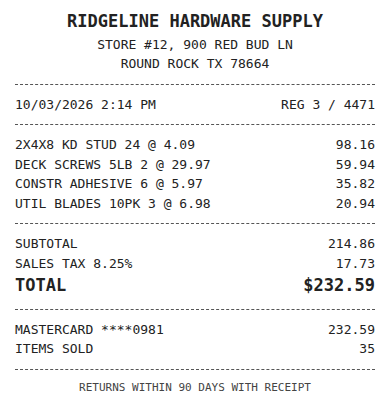
Receipt
Ridgeline Hardware
Oct 3, $232.59
Card ending 0981
Bank line in QuickBooks
RIDGELINE HARDWARE #12
Oct 4, $232.59
Matched, 2 day window
Worked example for a two-location Toast restaurant
Take a neighborhood taqueria with a second location across town, both on Toast, both booked into one QuickBooks Online company with location tracking turned on. Between them they have seven regular vendors: a broadline distributor, a tortilleria, produce, meat, dairy, beer and wine, and paper and chemicals. Each site gets roughly 25 to 30 deliveries a week across those vendors, plus a weekly warehouse club run on the company card.
That comes to about 220 to 260 documents a month, inside the Company plan limit of 300 a month and 40 a day. On xtraCHEF Essentials the same group pays 2 x $179 = $358 a month, or $4,296 a year. On ReceiptQBO Company it pays $49 a month, or $288 a year billed yearly. The difference is $4,008 a year, before any onboarding.
If the group later opens a third site in the same QBO company and volume passes 300 a month, it moves to a bigger plan instead of paying a third location fee. If each site is its own LLC with its own QuickBooks company, a bookkeeper plan covers them together, which is the next section.
The routine after the switch: invoices arrive by email or phone photo all week, rules post the clean ones from known vendors, and the bookkeeper clears the short review queue on Friday. Month end starts with accounts payable already complete and every bill carrying its image.
Bookkeepers with several Toast restaurant clients
Outside bookkeepers feel the per location price most, because every client pays it separately and most of them only use invoice capture. ReceiptQBO Bookkeeper is $149 a month billed yearly ($1,788 a year) for up to 25 client QuickBooks Online companies and 2,500 pooled documents a month, with one review queue across all clients and weekly missing receipt reminders to each owner.
Compare that with ten single-location clients on xtraCHEF Essentials at $2,148 each, or $21,480 a year paid across the practice. The receipt scanner for bookkeepers page covers how the shared queue and client dashboard work, and matching receipts to bank transactions explains how card receipts link to lines already in the feed.
Restaurant clients on other platforms come up too. Our MarginEdge alternative page runs the same math for a $350 per location tool, and the Restaurant365 pricing guide covers the case where a restaurant is told to leave QuickBooks altogether.
xtraCHEF and ReceiptQBO side by side
| Topic | xtraCHEF by Toast | ReceiptQBO |
|---|---|---|
| How it is priced | Per location, per month | Per QuickBooks Online company |
| Entry price | Essentials $179 a month per location | $49 a month, or $24 a month billed yearly |
| Two locations, one year | $4,296 on Essentials | $288 billed yearly on Company |
| Invoice reading and accounting sync | Yes, from Essentials | Yes, Bill or Expense posted with the image |
| QBO locations and classes | Through its accounting sync | Synced from QBO, set by rule or in review |
| Inventory and recipe costing | Pro, $279 a month per location | No |
| Toast POS data in the same tool | Yes | No |
| Best for | Kitchens that cost recipes and count inventory | Restaurants that need invoices in QBO |
xtraCHEF prices come from the Toast help center. Quotes can vary by number of locations and invoices. All prices are USD. Confirm current prices before buying.
Move invoice entry from xtraCHEF to ReceiptQBO
- Connect QuickBooks Online. Sign in with Intuit and sync the chart of accounts, locations, classes and vendors.
- Redirect vendor email. Give suppliers the new forwarding address and put the upload link on each manager phone.
- Write a rule per vendor. Map each regular supplier to its cost of goods account and location, then check the first week.