November 17, 2026, 8 min read, by the ReceiptQBO team
Smart Receipts pricing and app cost for QuickBooks Online users
Smart Receipts costs $0 on Free, $99.99 a year or $12.99 a month on Pro, and $139 a year or $17.99 a month on Max, on its web pricing page. Free is mobile only with manual entry. Pro adds AI reading, email forwarding and PDF, CSV and ZIP exports, and Max adds US and Canadian bank connections. QuickBooks is not named on the page, so for one business it is the cheaper tool, and for a QuickBooks Online practice the export step is where the real cost sits.
QuickBooks Online expense, ready to post
Confidence 93%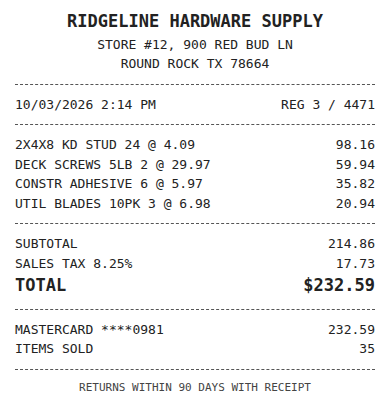
- Vendor
- Ridgeline Hardware Supply
- Date
- Oct 3, 2026
- Total
- $232.59
- Account
- Job Materials
- Class
- Field Ops
- Payment
- Card ending 0981

How much does Smart Receipts cost?
Smart Receipts has three plans on its own website. Free costs $0, runs only in the mobile app, and covers manual receipt entry with basic expense reports. Pro costs $99.99 a year (about $8.33 a month) or $12.99 billed monthly. Max costs $139 a year (about $11.58 a month) or $17.99 billed monthly.
Pro is the first plan with web access. It adds AI receipt recognition, email forwarding, automatic cloud backup, spending insights and exports to PDF, CSV and ZIP. Max keeps all of that and adds bank connections for the US and Canada plus bank statement and CSV imports. The prices come from the pricing section on smartreceipts.co, which also notes that in-app purchase prices can differ from the web prices.
That last point matters more than it looks. If a client subscribes from inside the iPhone or Android app, the store price applies, and app store listings for receipt apps change often. Ask the client which receipt shows the charge before you add it to their software budget.
Why do Smart Receipts prices differ between sites?
Search results mix several sources, and they disagree. Directory listings such as Capterra show an older two-tier structure with a Lite plan at $49.99 per user a year and Pro at $99.99. App store pages show different monthly and yearly figures again, and at least one app with a very similar name (Smart Receipts: Expense Track) is a different product from a different developer, with its own price list.
For budgeting, use the vendor's own pricing page and the receipt from the store the client actually paid through. Treat directory prices as history. If you manage software for clients, write the plan name and billing period next to the amount, because $12.99 a month and $99.99 a year are both "Pro" and they are not the same spend.
Fwd: Your Lowe's receipt
Forwarded email, 2 min ago
IMG_4471.HEIC
Client link, 9 min ago
Invoice #88213 from Sunbelt Rentals
Gmail filter, 22 min ago
38 files from October folder
Batch upload, 1 hr ago
Is monthly or yearly Smart Receipts billing cheaper?
Yearly is cheaper for anyone who keeps the app for more than about eight months. The worked numbers:
- Pro monthly: 12 x $12.99 = $155.88 a year, against $99.99 billed yearly. Yearly saves $55.89, about 36 percent.
- Max monthly: 12 x $17.99 = $215.88 a year, against $139 billed yearly. Yearly saves $76.88, about 36 percent.
Pro monthly passes the yearly price after the eighth month (8 x $12.99 = $103.92). Max monthly passes it after the eighth month too (8 x $17.99 = $143.92). A seasonal user, such as someone who only tracks receipts for a few busy months before filing, can still come out ahead on monthly billing.
Does Smart Receipts work with QuickBooks Online?
Not directly, based on its public pages. The pricing section lists PDF, CSV and ZIP exports and does not mention QuickBooks. So the route into a QuickBooks Online company is a file. Someone exports a report, then either keys each line into QBO, imports a CSV through a third-party importer, or attaches the PDF to transactions by hand.
For a freelancer who hands one yearly report to a tax preparer, that is fine. The accountant gets a tidy PDF with images, and the books are built from bank data anyway.
For a bookkeeper it is the expensive part. Every exported receipt still needs an account, a class or location if the client uses them, a vendor that matches the QBO vendor list, and a link to the card or bank line that is already in the feed. Our Smart Receipts alternative page compares that workflow side by side, and the guide to matching receipts to bank transactions shows what the matching step looks like when it happens automatically.
Expense, ready to post
96%- Vendor
- Sunbelt Rentals
- Account
- 6600 Equipment Rental
- Class
- Field Ops
- Location
- Round Rock
- Project
- Lakeview Deck Project
- Billable
- Yes, to customer
What does Smart Receipts cost for a bookkeeper with 25 clients?
Here is the subscription math, assuming each client company holds its own Smart Receipts account, because receipts, reports and bank connections are tied to the account.
- 25 clients on Pro yearly: 25 x $99.99 = $2,499.75 a year.
- 25 clients on Max yearly: 25 x $139 = $3,475 a year.
- 25 clients on Pro monthly: 25 x $155.88 = $3,897 a year.
ReceiptQBO Bookkeeper costs $149 a month billed yearly, which is $1,788 a year for up to 25 client companies, 2,500 pooled documents a month and an unlimited team with Preparer and Reviewer roles. Billed monthly it is $299.
Now the hidden line. Say each client sends 60 receipts a month, so 1,500 receipts across the practice. If keying one exported receipt into QBO and attaching its image takes one minute, that is 25 hours a month of data entry before anyone reviews anything. Change the assumptions to your own numbers: even at 30 seconds per receipt it is 12.5 hours. That labor is what a practice plan replaces, and it is usually bigger than the subscription difference.
When is Smart Receipts the better buy?
Smart Receipts is the better buy for one person or one small business that wants a native phone app, mileage and expense reports, and a PDF or CSV for the accountant at year end. Pro at $99.99 a year is about a third of ReceiptQBO Company, which is $24 a month billed yearly ($288 a year) for one QuickBooks Online company, 300 documents a month and up to 5 team members. If you do not use QuickBooks Online at all, Smart Receipts is also the better fit, because ReceiptQBO supports QBO only, with no QuickBooks Desktop and no Xero.
ReceiptQBO is the better buy when receipts have to end up coded inside QuickBooks Online. It reads each receipt (vendor, date, subtotal, tax, tip, total, card last 4), codes it from the client company's own accounts, classes, locations and customers, applies vendor rules that win over the AI, and looks for the matching bank or card transaction. A match attaches the image to that transaction. No match creates an Expense or Bill with the image. Practices see more detail on the receipt scanner for bookkeepers page.
Receipt
Ridgeline Hardware
Oct 3, $232.59
Card ending 0981
Bank line in QuickBooks
RIDGELINE HARDWARE #12
Oct 4, $232.59
Matched, 2 day window
How to decide before paying for a year
Run one real month before you commit to annual billing on either side.
- Count documents per client. Receipts plus supplier bills. That tells you whether a 300 document Company plan or a pooled practice plan fits.
- Time the handoff. Take ten Smart Receipts exports and time how long it takes to get them coded and matched in QBO. Multiply by your monthly volume.
- Check who reviews. If one reviewer looks at every client, a shared review queue saves the most. If clients run their own books and you only check in at tax time, per-client apps are fine.
- Check record keeping. The IRS expects records that support income and deductions, and its recordkeeping guidance is the place to confirm what to keep. Having the image attached to the transaction in QBO makes that easier to prove later.
If you are also pricing other capture apps, our SparkReceipt pricing guide and Dext pricing breakdown use the same 1 and 25 client math, so the totals line up.
Smart Receipts and ReceiptQBO yearly cost
| Plan | Monthly billing | Yearly billing | What it covers | QuickBooks Online |
|---|---|---|---|---|
| Smart Receipts Free | $0 | $0 | Mobile only, manual entry, basic reports | Not named |
| Smart Receipts Pro | $12.99 ($155.88 a year) | $99.99 | AI reading, email forwarding, web, PDF, CSV and ZIP export | Export files only |
| Smart Receipts Max | $17.99 ($215.88 a year) | $139 | Pro plus US and Canada bank connections and imports | Export files only |
| ReceiptQBO Company | $49 | $288 ($24 a month) | 1 QBO company, 300 documents a month, 5 team members | Coding, bank match, Expense or Bill with image |
| ReceiptQBO Bookkeeper | $299 | $1,788 ($149 a month) | Up to 25 QBO companies, 2,500 pooled documents, shared review | Coding, bank match, Expense or Bill with image |
Smart Receipts prices come from the pricing section of smartreceipts.co (web prices, in-app prices may differ). All prices are USD. Confirm current prices before buying.
Smart Receipts pricing questions
Is Smart Receipts free?
Smart Receipts has a Free plan at $0, but it runs only in the mobile app and covers manual entry and basic expense reports. AI receipt reading, email forwarding, web access and PDF, CSV and ZIP exports start with Pro at $99.99 a year or $12.99 a month.
How much is Smart Receipts Pro?
Smart Receipts Pro is $99.99 a year, about $8.33 a month, or $12.99 billed monthly on the vendor website. Paying monthly for a full year costs $155.88. In-app purchase prices on iPhone or Android can differ from these web prices.
What does Smart Receipts Max add?
Max costs $139 a year or $17.99 a month and adds bank connections for the US and Canada, plus bank statement and CSV imports, on top of everything in Pro. It still exports reports rather than posting coded entries into QuickBooks Online.
Does Smart Receipts integrate with QuickBooks Online?
Its public pricing page lists PDF, CSV and ZIP exports and does not name QuickBooks. Getting receipts into QBO means importing or keying the exported data and attaching images, so ask the vendor before you buy a year for that purpose.
Is ReceiptQBO cheaper than Smart Receipts?
For one business, no. Smart Receipts Pro at $99.99 a year costs less than ReceiptQBO Company at $288. For 25 clients, 25 Pro accounts cost $2,499.75 a year against $1,788 for ReceiptQBO Bookkeeper, before counting time spent keying exports.