October 30, 2026, 7 min read, by the ReceiptQBO team
SparkReceipt pricing for QuickBooks Online users and bookkeepers
SparkReceipt costs $6.90 a month or $69 a year on Pro and $12.90 a month or $129 a year on Elite. That is per user, with extra users at $1 a month. For one company SparkReceipt is cheaper, while ReceiptQBO Bookkeeper at $149 a month billed yearly costs less than 25 Elite accounts for a QuickBooks Online practice.
QuickBooks Online expense, ready to post
Confidence 93%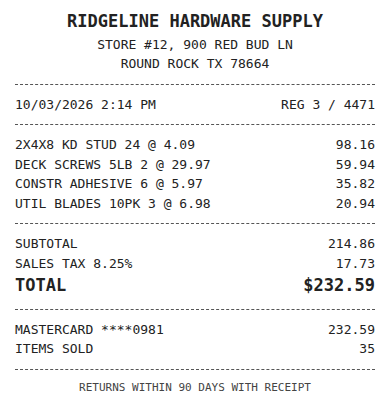
- Vendor
- Ridgeline Hardware Supply
- Date
- Oct 3, 2026
- Total
- $232.59
- Account
- Job Materials
- Class
- Field Ops
- Payment
- Card ending 0981

How much does SparkReceipt cost?
SparkReceipt Pro costs $6.90 a month or $69 a year, and Elite costs $12.90 a month or $129 a year. Both are one-user plans. Extra users cost $1 a month or $12 a year, accountant access is free, and there is a 7 day trial. These figures come from sparkreceipt.com/pricing. Regional pages for the UK and Canada show different currencies and seat rules, so read the US page.
Pro allows 50 documents a month shared across the account, 100 AI credits per user, one inbox and one bank feed. Elite allows unlimited documents under fair use, 200 credits, several inboxes and feeds, and extra export templates such as Sage, DATEV and Wave. Founder setup help is $400 and sits on top of Elite. Credit packs run from $12 for 1,000 credits up to $168 for 20,000.
Third-party listings quote $9 and $12 per seat, a free tier, or no price at all. Those are stale or regional. Use the vendor page, and re-check it on the day you buy.
Does SparkReceipt work with QuickBooks Online?
Yes, SparkReceipt publishes receipts to QuickBooks Online. Its pricing page lists QuickBooks Online under Pro, while its homepage describes QuickBooks and Xero publishing under Elite. Those two statements conflict, so ask SparkReceipt which plan includes the connection before you pay for a year.
The integration is per business. A bookkeeper with 20 clients needs to know whether each client becomes its own SparkReceipt account, how bank feeds are limited per plan, and where the review happens. Pro includes one bank feed, which matters if a client has two cards and a checking account.
Run one real week of a client's receipts through the trial. Check that vendors, accounts and classes land the way that client's QBO company expects, and that each posted entry carries the image. Our SparkReceipt alternative page walks through where a practice workflow differs.
Fwd: Your Lowe's receipt
Forwarded email, 2 min ago
IMG_4471.HEIC
Client link, 9 min ago
Invoice #88213 from Sunbelt Rentals
Gmail filter, 22 min ago
38 files from October folder
Batch upload, 1 hr ago
What does SparkReceipt cost for a bookkeeper with many clients?
It depends on how your clients are set up. SparkReceipt also supports linked accounts under a main account with a free accountant seat, so confirm how billing works across them. Taking the one-user prices at face value, 25 client companies on Pro yearly cost 25 x $69 = $1,725 a year. On Elite yearly they cost 25 x $129 = $3,225 a year. ReceiptQBO Bookkeeper yearly costs $149 x 12 = $1,788 a year for up to 25 companies and 2,500 pooled documents a month.
So Pro is slightly cheaper than ReceiptQBO on subscription alone, if Pro's 50 documents a month, one inbox and one bank feed cover every client and if your clients are fine with that account structure. Elite is where the gap opens, and Elite is where the unlimited document allowance and extra feeds live. Add $1 a month per extra user and any credit packs, and the totals move.
For one small company the answer flips. One Elite seat at $129 a year is far below ReceiptQBO Company at $24 a month billed yearly, which is $288 a year. SparkReceipt is the cheaper tool for a single business that wants mobile capture and a low price, and we say so on purpose.
What do you get for the extra money with a practice plan?
A practice plan buys time on the review side, not the capture side. ReceiptQBO codes each receipt using the connected client company's own accounts, classes, locations and customers, applies vendor rules per client, and looks for the matching bank or card transaction before posting. A matched receipt attaches to that transaction, and an unmatched one creates an Expense or Bill with the image.
Preparers and Reviewers share one queue across companies, so a reviewer approves uncertain items for 20 clients in one place instead of opening 20 accounts. Missing-receipt reminders go to the client weekly. See how to match receipts to bank transactions for the matching logic.
If your clients mainly need a cheap phone app, mileage tracking or exports for non-QBO ledgers, SparkReceipt is built for that. If you spend your hours coding and chasing, price the hours, not the subscription.
Expense, ready to post
96%- Vendor
- Sunbelt Rentals
- Account
- 6600 Equipment Rental
- Class
- Field Ops
- Location
- Round Rock
- Project
- Lakeview Deck Project
- Billable
- Yes, to customer
Which plan should you pick before paying for a year?
Start with a month of real documents. Count receipts per client, the number of cards and bank accounts, and how many people upload. If every client is under 50 documents with one feed, SparkReceipt Pro may cover it at the lowest price. If volume, feeds or inboxes exceed that, Elite pricing applies, and the comparison with a flat practice plan gets close.
Then decide who does the review. A flat plan makes sense when one reviewer touches every client. Per-seat pricing makes sense when each client runs their own books and you only look in occasionally. For a practice with itemized bills and heavy volume, also read our Dext pricing breakdown and the Hubdoc pricing guide to compare against the other common choices.
Once receipts are clean in the ledger, the next job is usually reporting. Practices that hand clients board-ready financial statements from a bookkeeping export can spend the saved review time there.
SparkReceipt and ReceiptQBO plan costs
| Plan | Price in USD | Documents | Billing basis | QBO fit |
|---|---|---|---|---|
| SparkReceipt Pro | $6.90 monthly or $69 yearly | 50 documents monthly shared | Per user, 1 inbox, 1 bank feed | QBO listed on pricing page |
| SparkReceipt Elite | $12.90 monthly or $129 yearly | Unlimited, fair use | Per user, several inboxes and feeds | QBO publishing named on homepage |
| ReceiptQBO Company | $49 monthly or $24 a month billed yearly | 300 documents monthly | Per company, up to 5 team members | QBO coding and matching |
| ReceiptQBO Bookkeeper | $299 monthly or $149 a month billed yearly | 2,500 pooled monthly | Per practice, up to 25 companies | QBO coding, matching, shared review |
SparkReceipt prices come from its US pricing page and homepage. Confirm current prices and which plan includes QuickBooks Online before buying.
SparkReceipt pricing questions
What is the cheapest SparkReceipt plan with QuickBooks Online?
The pricing page lists QBO under Pro at $69 a year or $6.90 monthly, but the homepage ties it to Elite. Confirm with SparkReceipt before buying.
Is SparkReceipt free for accountants?
Accountant access is free on SparkReceipt, but the client still pays for the plan that holds the receipts.
How many documents does SparkReceipt Pro include?
Pro allows 50 documents a month shared across the account, with 100 credits per user, one inbox and one bank feed.
Is ReceiptQBO cheaper than SparkReceipt?
For one company, no. SparkReceipt Elite at $129 a year costs less than ReceiptQBO Company at $288. For 25 clients, Elite at $3,225 costs more than Bookkeeper at $1,788.
Does ReceiptQBO have a free trial?
The receipt reader at the top of this page works without an account, so you can read a real receipt before you subscribe.