October 20, 2026, 8 min read, by the ReceiptQBO team
WellyBox pricing and plans for QuickBooks Online users and bookkeepers
WellyBox pricing runs from $19 a month on Basic, billed yearly only, to $124 a month on Enterprise with monthly billing. Business costs $49 a month billed yearly or $59 billed monthly, with different document, user and email lookback limits. For a QuickBooks Online practice, Enterprise costs $1,188 a year with yearly billing and includes unlimited clients. That is less than ReceiptQBO Bookkeeper at $1,788 a year, so compare coding, bank matching and review work alongside subscription prices.
QuickBooks Online expense, ready to post
Confidence 93%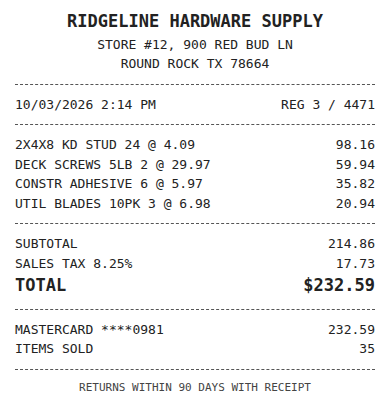
- Vendor
- Ridgeline Hardware Supply
- Date
- Oct 3, 2026
- Total
- $232.59
- Account
- Job Materials
- Class
- Field Ops
- Payment
- Card ending 0981

How much does WellyBox cost per month?
WellyBox Basic costs $19 a month billed yearly only. Business costs $49 a month billed yearly or $59 billed monthly. Enterprise costs $99 a month billed yearly or $124 billed monthly. These are US dollar prices from the public WellyBox pricing page, checked October 2026. Some directories still show older prices around $6 to $16, which are out of date.
Basic covers 50 documents a month, 2 users and a 12 month email lookback. Business billed monthly covers 500 documents, 10 users and 24 months of lookback. Business billed yearly includes unlimited documents and users with 48 months of lookback. Enterprise adds unlimited clients and a clients dashboard. Confirm its document, user and lookback terms before buying rather than assuming the Business allowances apply.
For a QuickBooks buyer, price is only the first filter. Count documents, people who need access and the months of email history you need to search. Then check what happens after capture. Our WellyBox alternative for QuickBooks Online comparison covers how inbox collection differs from coding receipts to your ledger and matching them to charges.
Is WellyBox billed monthly or yearly?
WellyBox offers both billing schedules on Business and Enterprise, but Basic is yearly only. The $19 Basic price is a monthly equivalent of a $228 yearly subscription. Business yearly is $49 multiplied by 12, or $588. Paying $59 each month for a full year totals $708. Enterprise yearly is $99 multiplied by 12, or $1,188, compared with $1,488 over a year at $124 monthly.
Business changes more than price when you change billing schedules. The yearly option raises documents from 500 to unlimited, users from 10 to unlimited and email lookback from 24 to 48 months. Treat Business monthly and Business yearly as different offers when assessing capacity. A lower monthly equivalent does not describe all the differences between them.
The practical question is whether you need monthly billing flexibility or the yearly allowances. If historical email collection is the reason you are buying, check how far back your missing receipts go before choosing. ReceiptQBO accepts forwarded receipts and uploads, but it does not crawl past mailboxes. A cheaper subscription would not replace that historical search if it is the job you need done.
Fwd: Your Lowe's receipt
Forwarded email, 2 min ago
IMG_4471.HEIC
Client link, 9 min ago
Invoice #88213 from Sunbelt Rentals
Gmail filter, 22 min ago
38 files from October folder
Batch upload, 1 hr ago
Which WellyBox plan does a QuickBooks user need?
Choose by volume and users first, then verify the QuickBooks connection. Basic fits the published limits only when you stay within 50 documents a month and 2 users. A business with 80 receipts and 3 staff exceeds both limits, so Business is the WellyBox plan to compare. Monthly Business allows 500 documents and 10 users, while yearly Business removes those limits.
Software directories list QuickBooks and Xero integrations. WellyBox's pricing page says it integrates with top accounting software without naming them. That evidence does not establish which QuickBooks Online fields sync on each plan. Before paying, confirm your edition, the plan that includes the connection and what reaches QuickBooks. Ask whether account, class, location, customer and project selections transfer as needed.
WellyBox captures through a connected inbox, WhatsApp, uploads and Google Drive sync, and offers Excel export. Those sources can be useful when receipts arrive in different places. ReceiptQBO works only with QuickBooks Online and collects through a company forwarding address, a Gmail filter or a phone upload link. Choose the collection method your staff will actually use, then check the accounting work left afterward.
What WellyBox costs a bookkeeping practice
Enterprise is the WellyBox practice offer to evaluate because it lists unlimited clients and a clients dashboard. At $99 a month billed yearly, the subscription is $1,188 a year. Monthly billing at $124 totals $1,488 over a full year. The public unlimited client offer means you should not multiply a Business subscription by every client to make the practice comparison.
ReceiptQBO Bookkeeper costs $299 a month or $149 a month billed yearly, totaling $1,788 a year. It covers 25 QuickBooks Online companies and 2,500 documents a month pooled across them. Firm costs $899 monthly or $449 a month billed yearly and covers 100 companies with 10,000 pooled documents. A practice needs to count both companies and receipts to choose its plan.
WellyBox has the lower yearly sticker price for the 20 client case below. ReceiptQBO's case rests on coding to each client's accounts, bank matching and a review queue across clients, with weekly missing receipt reminders. The receipt scanner workflow for bookkeepers explains that setup. Compare the work your team performs after collection before deciding whether the higher subscription is justified.
Expense, ready to post
96%- Vendor
- Sunbelt Rentals
- Account
- 6600 Equipment Rental
- Class
- Field Ops
- Location
- Round Rock
- Project
- Lakeview Deck Project
- Billable
- Yes, to customer
Yearly cost examples for a business and a practice
A QBO business with 80 receipts a month and 3 staff. WellyBox Basic is too small. Business yearly costs $49 multiplied by 12, or $588. Business monthly costs $59 multiplied by 12, or $708 over a year. ReceiptQBO Company covers 300 documents a month and up to 5 team members for $24 multiplied by 12, or $288 billed yearly. Its $49 monthly option totals $588 over a year. Both Business billing options and Company cover this example's receipt and staff counts.
That does not make ReceiptQBO cheaper for every business. At 50 documents or fewer and no more than 2 users, WellyBox Basic costs $228 a year against Company at $288. Basic's $19 monthly equivalent is below Company's $24. If inbox search is the main requirement, that lower price deserves consideration.
A practice with 20 QBO clients. WellyBox Enterprise yearly costs $1,188. ReceiptQBO Bookkeeper yearly costs $1,788, a $600 higher subscription. Bookkeeper fits only if those clients together stay within 2,500 documents a month. If you choose monthly billing instead, Enterprise totals $1,488 a year and Bookkeeper totals $299 multiplied by 12, or $3,588. WellyBox is cheaper on sticker under either billing schedule. No claim about review time changes that arithmetic.
Compare the cost after receipt capture
A collected receipt still needs the right accounting treatment. For a QuickBooks Online buyer, check how the tool handles accounts, classes, locations, customers and projects. ReceiptQBO codes to those company lists and applies vendor rules. It also matches receipts to bank and card transactions already in QuickBooks Online, so the review can focus on the existing charge.
Bank data matters when matching receipts to card or bank charges. ReceiptQBO supports bank file import in CSV, OFX, QFX and QBO Web Connect formats. If the bank only offers a CSV download and you need a Web Connect import, you can convert the CSV bank file to a QBO Web Connect file before importing it. Compare this workflow using a charge and its receipt rather than assuming an accounting integration includes matching.
Use your own figures for the labor comparison. Yearly handling cost equals receipts handled per year multiplied by average minutes per receipt, divided by 60, multiplied by your hourly cost. Measure coding, matching and corrections for the same work in each tool. Add the subscription afterward. The result may favor either product, and a capture feature you need can matter more than a small price difference.
Receipt
Ridgeline Hardware
Oct 3, $232.59
Card ending 0981
Bank line in QuickBooks
RIDGELINE HARDWARE #12
Oct 4, $232.59
Matched, 2 day window
How to decide before buying
Start with your busiest month's documents, the people who need access and your need for old email receipts. For a practice, add the client count and pooled volume. Confirm the QuickBooks Online connection and its fields with WellyBox before committing. Use the yearly totals above when comparing annual commitments, and keep monthly quotes on the same billing basis.
WellyBox deserves a place on the shortlist when finding receipts in old mailboxes is the main task, WhatsApp collection matters or its lower subscription fits your budget. ReceiptQBO is worth testing when the work centers on coding, matching and reviewing QuickBooks Online receipts. For other price comparisons, read Shoeboxed pricing for QuickBooks Online users and Dext pricing for QuickBooks bookkeepers.
For the practice, review a receipt from each kind of client workflow you handle. Check an expense that needs a class, one assigned to a customer or project, and one with a bank transaction already in QuickBooks. Record the corrections your team makes and use those observations in the handling cost formula.
Try reading one receipt at the top of this page. Check the extracted details and suggested coding against what you would enter yourself, then assess the wider workflow against your needs. ReceiptQBO has no free plan. Its Company and practice plan pricing lets you compare the subscription with your own document count and handling cost before buying.
WellyBox plans compared for QuickBooks users
| Plan | Price | Documents | Users | Email lookback | Fit for QuickBooks |
|---|---|---|---|---|---|
| Basic | $19 a month billed yearly only, $228 a year | 50 a month | 2 | 12 months | Light volume, confirm QBO sync |
| Business monthly | $59 a month, $708 over a year | 500 a month | 10 | 24 months | Business team, confirm QBO sync |
| Business yearly | $49 a month billed yearly, $588 a year | Unlimited | Unlimited | 48 months | Higher volume, confirm QBO sync |
| Enterprise | $99 a month billed yearly or $124 monthly | Confirm with WellyBox | Confirm with WellyBox | Confirm with WellyBox | Unlimited clients and clients dashboard, confirm QBO sync |
Prices and stated allowances are from WellyBox's public pricing page in US dollars, checked October 2026, and can change. Confirm Enterprise limits and QuickBooks Online integration details before buying.
WellyBox pricing questions
Is WellyBox free?
No free plan is listed on WellyBox's pricing page. Basic is the lowest plan at $19 a month billed yearly, or $228 a year. It includes 50 documents a month, 2 users and a 12 month email lookback. Check those limits against your needs before paying.
Does WellyBox integrate with QuickBooks?
QuickBooks is listed in software directories as a WellyBox integration. The pricing page itself only says top accounting software without naming products. Confirm QuickBooks Online support, the required plan and the fields that sync before buying, especially if you need classes, customers, projects or matching to existing transactions.
Is WellyBox cheaper than Dext?
WellyBox Basic is cheaper at $19 a month billed yearly than Dext business pricing starting from $25.21 a month billed yearly, checked October 2026. Basic has a 50 document limit and 2 users. WellyBox Business starts at $49 a month billed yearly, so the entry price comparison does not apply to every plan.
What is the best WellyBox alternative for QuickBooks Online?
ReceiptQBO is a strong choice when you need QuickBooks Online coding, vendor rules, bank matching and a review queue across clients. Company is $24 a month billed yearly. WellyBox may fit better for historical inbox collection or a lower practice subscription, so choose around the work you need done.