October 15, 2026, 8 min read, by the ReceiptQBO team
Shoeboxed pricing and plans for QuickBooks Online users and bookkeepers
Shoeboxed pricing runs from $9 a month on Starter to $179 a month on Paper Plus, per its US pricing page, with yearly billing at $97, $297, $797 and $1,997. For a QuickBooks user the real entry price is the Pro plan at $29 a month or $297 a year, because Starter does not list the QuickBooks integration or Gmail receipt sync. Extra scans above your plan cost $0.07 to $0.19 per digital document and $0.77 to $2.00 per paper document.
QuickBooks Online expense, ready to post
Confidence 93%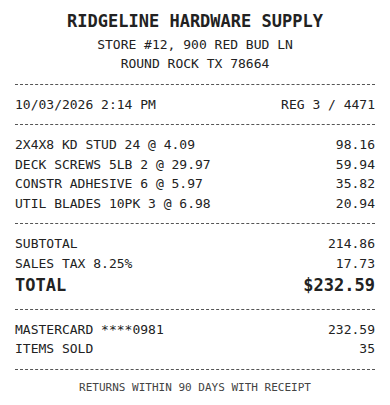
- Vendor
- Ridgeline Hardware Supply
- Date
- Oct 3, 2026
- Total
- $232.59
- Account
- Job Materials
- Class
- Field Ops
- Payment
- Card ending 0981
How much does Shoeboxed cost per month?
Shoeboxed costs $9 a month on Starter, $29 on Pro, $79 on Plus and $179 on Paper Plus when billed monthly, per its public US pricing page. Paying yearly brings those down to $97, $297, $797 and $1,997 a year, which works out to $8.08, $24.75, $66.42 and $166.42 a month. Every plan includes unlimited mileage tracking.
Each plan buys a monthly allowance of digital scans (receipts you upload, email or sync) and paper scans (receipts you mail in), plus a number of Magic Envelopes, the prepaid envelopes Shoeboxed sends you for mailing paper receipts to its scanning team. Starter gives 50 digital scans a month and 20 paper scans a year. Pro gives 250 digital and 50 paper a month. Plus gives 1,000 and 150. Paper Plus gives 5,000 and 300.
Shoeboxed charges your card at signup and offers a 30 day money-back guarantee instead of a free trial, per the same page. If a Magic Envelope has already shipped, it asks you not to request the refund, because the mailing and processing costs are already spent.
Which Shoeboxed plan works with QuickBooks?
Pro, Plus and Paper Plus list the QuickBooks integration on the Shoeboxed pricing page. Starter does not, and it also leaves out Gmail receipt sync. So if your books live in QuickBooks Online, the cheapest Shoeboxed plan you can actually use is Pro at $29 a month, or $297 a year.
That changes the comparison most people make. The $9 headline price is real, but it fits someone who wants a tidy digital archive for taxes, not a business that needs receipts to land in QuickBooks. Starter also keeps digital scans for 3 years, while the higher plans keep them for as long as the account is active.
User seats rise with the plan as well. Starter allows 3 users, Pro 5, and Plus and Paper Plus 10. A business with a few field staff on company cards usually needs Pro at minimum just for the seats.
Fwd: Your Lowe's receipt
Forwarded email, 2 min ago
IMG_4471.HEIC
Client link, 9 min ago
Invoice #88213 from Sunbelt Rentals
Gmail filter, 22 min ago
38 files from October folder
Batch upload, 1 hr ago
What extra scans and envelopes cost
Going over your allowance is billed per document, and the rate depends on the plan, per the Shoeboxed pricing page:
- Starter: $0.19 per extra digital scan and $2.00 per extra paper scan.
- Pro: $0.09 per digital scan and $0.97 per paper scan.
- Plus: $0.09 per digital scan and $0.87 per paper scan.
- Paper Plus: $0.07 per digital scan and $0.77 per paper scan.
Extra Magic Envelopes are $9 each on every plan. Pro includes one envelope a quarter, Plus one a month and Paper Plus two a month.
Digital overage is cheap. Paper overage is not. A business that mails in 100 paper receipts a month on Pro pays for 50 extra paper scans at $0.97, which adds about $48.50 to a $29 plan. If most of your receipts are paper, the real decision is between Pro with overage and Plus, and the math usually favors Plus once you pass about 100 paper receipts a month.
What a QuickBooks Online business or bookkeeper really pays
Here are three cases using the published prices. All of them assume the books are in QuickBooks Online, so Starter is out.
One business, 150 receipts a month, nearly all digital. Pro covers it with room to spare at $297 a year. The ReceiptQBO Company plan covers 300 documents for one QuickBooks Online company at $288 a year billed yearly. The price is a wash, so the choice comes down to what happens after capture, covered in the next section.
One business, 400 digital receipts a month. On Pro that is 150 extra digital scans at $0.09, or $13.50 a month. Billed yearly, that comes to about $297 plus $162, or $459 a year. Plus at $797 a year is the alternative if you also mail paper. ReceiptQBO Company tops out at 300 documents, so a business at 400 a month belongs on a larger ReceiptQBO plan, and Shoeboxed Pro with overage is likely the cheaper option here if capture is all you need.
A bookkeeper with 20 QuickBooks Online clients. If each client keeps its own Shoeboxed Pro account, 20 accounts cost about $5,940 a year, and every one is a separate login to watch. The ReceiptQBO Bookkeeper plan covers up to 25 client companies with 2,500 documents pooled across them for $1,788 a year billed yearly, with one review queue for all of them. Check whether Shoeboxed offers you partner pricing first, since practice terms are not on its public page.
Expense, ready to post
96%- Vendor
- Sunbelt Rentals
- Account
- 6600 Equipment Rental
- Class
- Field Ops
- Location
- Round Rock
- Project
- Lakeview Deck Project
- Billable
- Yes, to customer
What Shoeboxed does not do inside QuickBooks
Shoeboxed is a capture and filing service. It is very good at turning a pile of paper into searchable images, and the Magic Envelope means nobody in the office scans anything. The cost that does not show on the pricing page is the time spent after the scan.
Someone still has to choose the right expense account, class and customer for each receipt, and make sure the receipt does not create a second expense for a charge the bank feed already brought into QuickBooks. For a practice, that coding and matching is where most of the hours go.
ReceiptQBO is built for that step. It syncs each QuickBooks Online company's accounts, classes, locations, customers and projects, codes every receipt to those exact lists, applies your vendor rules, checks for duplicates and matches each receipt to the bank or card transaction already in QuickBooks before posting it with the image attached. If a client's bank only gives you PDF statements, you can convert the bank statement to a QBO file and import it so there is something to match against. The Shoeboxed alternative for QuickBooks Online page compares the two products feature by feature.
When Shoeboxed is the better buy
We sell a competing product, so here is the honest list of cases where Shoeboxed is worth its price.
- Most of your receipts are paper. No one on your team wants to scan, and mailing an envelope is easier. ReceiptQBO reads phone photos and scanned files but does not offer a mail-in service.
- You want mileage tracking in the same subscription. Every Shoeboxed plan includes unlimited mileage tracking.
- You need a searchable archive for tax time more than posted expenses. Starter at $97 a year is a low-cost way to keep receipts organized if QuickBooks sync is not required.
- You also use Wave or store files in Dropbox or Evernote. Shoeboxed lists those integrations, and ReceiptQBO works with QuickBooks Online only.
If your receipts are mostly digital and the slow part of the month is coding and matching in QuickBooks Online, you will save more hours with a tool that does that work.
Receipt
Ridgeline Hardware
Oct 3, $232.59
Card ending 0981
Bank line in QuickBooks
RIDGELINE HARDWARE #12
Oct 4, $232.59
Matched, 2 day window
How to price it against your own receipts
Count last month's receipts for each business, split into digital and paper. Add about 20% for your busiest month. If paper is under 50 a month and digital under 250, Pro is your Shoeboxed plan. Above that, compare Pro with overage against Plus using the per-scan rates above.
Then time the work after capture for one week: how many minutes it takes to code, match and fix each receipt in QuickBooks. That number, multiplied by your hourly rate, is usually bigger than the gap between any two subscriptions. You can see how ReceiptQBO handles your receipts before you pay anything: upload one receipt at the top of this page, or read the receipt scanner for bookkeepers page if you run a practice. Every ReceiptQBO plan is on the pricing page.
Shoeboxed plans in US dollars
| Plan | Monthly or yearly | Digital and paper scans | QuickBooks | Extra digital or paper scan |
|---|---|---|---|---|
| Starter | $9 a month or $97 a year | 50 a month and 20 a year | Not listed | $0.19 or $2.00 |
| Pro | $29 a month or $297 a year | 250 and 50 a month | Yes | $0.09 or $0.97 |
| Plus | $79 a month or $797 a year | 1,000 and 150 a month | Yes | $0.09 or $0.87 |
| Paper Plus | $179 a month or $1,997 a year | 5,000 and 300 a month | Yes | $0.07 or $0.77 |
Prices are from the Shoeboxed US pricing page, checked October 2026, before any promotional discount. They can change, so confirm on the vendor's own site.
Shoeboxed pricing questions
How much is Shoeboxed per month?
Shoeboxed costs $9 a month on Starter, $29 on Pro, $79 on Plus and $179 on Paper Plus when billed monthly. Billed yearly, the plans cost $97, $297, $797 and $1,997, per its US pricing page.
Does the Shoeboxed Starter plan work with QuickBooks?
No. The Shoeboxed pricing page lists the QuickBooks integration on Pro, Plus and Paper Plus only. A QuickBooks Online user needs at least Pro, at $29 a month or $297 a year.
Does Shoeboxed have a free trial?
Shoeboxed charges your card at signup and offers a 30 day, 100% money-back guarantee on all plans instead of a free trial. If a Magic Envelope has already shipped, it asks customers not to request a refund.
What happens if I go over my Shoeboxed scans?
Extra scans are billed per document. Digital scans cost $0.07 to $0.19 and paper scans $0.77 to $2.00 depending on the plan, and extra Magic Envelopes are $9 each.
Is Shoeboxed worth it for QuickBooks users?
Shoeboxed is worth it if most of your receipts are paper and you want them scanned for you by mail. If your receipts are mostly digital and the time goes into coding and matching them in QuickBooks Online, a tool that does that work saves more.