October 14, 2026, 8 min read, by the ReceiptQBO team
AutoEntry pricing and cost per month for QuickBooks Online bookkeepers
AutoEntry pricing runs from $13 a month for 50 credits to $469 a month for 2,500 credits, per its US pricing page, excluding tax. A receipt or plain invoice costs 1 credit, an invoice with line items 2 credits and a bank statement page 3 credits. Every plan includes unlimited users and unlimited clients, so a QuickBooks Online practice pays for its total credit use, not per client. The real monthly cost depends on how many of your documents need line items or statement pages.
QuickBooks Online expense, ready to post
Confidence 93%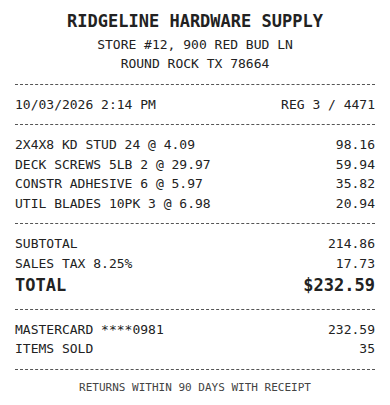
- Vendor
- Ridgeline Hardware Supply
- Date
- Oct 3, 2026
- Total
- $232.59
- Account
- Job Materials
- Class
- Field Ops
- Payment
- Card ending 0981

How much does AutoEntry cost per month?
AutoEntry costs $13 a month for 50 credits on its smallest plan and $469 a month for 2,500 credits on its largest, per its public US pricing page. Prices exclude sales tax and are billed monthly by card. There are six published plans, and the price per credit drops from $0.26 to $0.19 as the bundle grows.
Every plan includes unlimited users and, for accountants and bookkeepers, unlimited clients. AutoEntry offers a trial with 25 credits so you can test real documents before you pay. You can downgrade, pause or cancel up to 24 hours before renewal, and your data stays accessible for 13 months after you cancel.
The table below lists all six plans. What it cannot tell you on its own is what your month will cost, because a credit is not the same thing as a document. That is where most of the planning goes wrong, so the next sections walk through it.
How many credits does each document use?
AutoEntry charges by document type, not by document. Per its pricing page, the rates are:
- Expense receipt: 1 credit.
- Purchase or sales invoice, header only: 1 credit.
- Purchase or sales invoice with line items: 2 credits.
- Supplier statement: 2 credits.
- Bank or credit card statement: 3 credits per page.
So a practice that switches a construction client to itemized supplier invoices doubles the cost of that client overnight, with the same pile of paper. A ten page bank statement uses 30 credits, which is more than half of the Bronze plan on its own.
For receipts the math is simple, one receipt is one credit. For bills it depends on whether your clients need line items in QuickBooks Online to split costs across accounts, classes or jobs. Look at last month's bills for your three biggest clients and count how many had more than one expense line. That share is the number that moves your AutoEntry bill.
Fwd: Your Lowe's receipt
Forwarded email, 2 min ago
IMG_4471.HEIC
Client link, 9 min ago
Invoice #88213 from Sunbelt Rentals
Gmail filter, 22 min ago
38 files from October folder
Batch upload, 1 hr ago
What a QuickBooks Online practice really pays
Here are three practices doing the same arithmetic. Prices are the published monthly plans, before tax.
Small practice, 8 clients, 300 documents a month, all receipts and plain bills. That is 300 credits. Gold at $46 covers 200, so the comfortable fit is Platinum at $103 for 500 credits, with the spare credits rolling over for 90 days. At this size AutoEntry is cheaper than the ReceiptQBO Bookkeeper plan, which is $299 a month or $149 a month billed yearly.
Mid-size practice, 25 clients, 2,000 documents, 20% of bills itemized. 1,600 plain documents plus 400 itemized bills at 2 credits is 2,400 credits. That lands on Sapphire at $469 a month. The ReceiptQBO Bookkeeper plan covers up to 25 client companies and 2,500 documents for $299 a month, or $149 billed yearly, and an itemized bill counts as one document.
Busy month at the same practice. In tax season volume jumps to 2,800 documents. On AutoEntry that is about 3,400 credits, past the largest published plan, so the overdraft kicks in and the extra credits land on next month's bill. AutoEntry suggests booking a demo for a custom package above Sapphire. On ReceiptQBO the next step is the Firm plan, up to 100 companies and 10,000 documents for $899 a month, or $449 billed yearly.
The pattern is clear. Below roughly 1,000 credits a month, AutoEntry's small plans usually win on price. Above that, and especially when bills need line items, a flat document plan built for one ledger gets cheaper. If every client is on QuickBooks Online, the AutoEntry alternative for QuickBooks Online page compares the two products feature by feature.
Overage, rollover and the costs that surprise people
Three rules on the pricing page decide whether your bill stays where you planned it.
Overdraft. By default AutoEntry allows a 200% credit overage on your plan to absorb an unexpected spike. Extra credits are added to your next bill. That protects you from documents getting stuck at month end, but it also means a bad month shows up a month later, after you have already invoiced your clients.
Rollover. Unused credits roll over for 90 days. That smooths out small dips, but it does not help a practice whose volume is seasonal over a longer cycle, such as a heavy January to April and a quiet summer.
Statement pages. At 3 credits a page, bank statements are the most expensive thing you can send. Many QuickBooks Online practices do not need statement extraction at all, because the bank feed already brings the transactions in. If a client only hands you PDF statements, a dedicated tool that will convert PDF bank statements to Excel is often a cheaper route than spending capture credits on them.
Card is the only payment method, with no PayPal or direct debit, which matters if your practice pays software through a bill pay workflow.
Expense, ready to post
96%- Vendor
- Sunbelt Rentals
- Account
- 6600 Equipment Rental
- Class
- Field Ops
- Location
- Round Rock
- Project
- Lakeview Deck Project
- Billable
- Yes, to customer
When AutoEntry is the cheaper choice
We sell a competing product, so here is the honest list of cases where AutoEntry costs less or fits better.
- Low volume. One business with 40 receipts a month pays $13 on Bronze. Our Company plan is $49 a month, or $24 billed yearly, for 300 documents.
- Mixed ledgers. AutoEntry works with Sage, Xero, QuickBooks and several other ledgers. ReceiptQBO posts only to QuickBooks Online, so a practice split across ledgers may prefer one tool for all of them.
- You need PDF bank statement extraction. AutoEntry reads statement pages into transactions. ReceiptQBO imports bank files (CSV, OFX, QFX and QBO Web Connect) for matching but does not turn PDF statements into transactions.
- Sales invoices and purchase orders. AutoEntry handles sales invoices and lists purchase order matching. ReceiptQBO focuses on receipts and vendor bills.
If your clients are all on QuickBooks Online, your volume is in the thousands and a good share of bills need line items, the flat plan usually comes out ahead on both price and predictability.
How to check the numbers on your own client list
Take last month's documents for every client and sort them into four piles: receipts, plain bills, itemized bills and statement pages. Multiply by 1, 1, 2 and 3. Add 20% for your busiest month. That total is the AutoEntry plan you actually need, and it takes about fifteen minutes with a spreadsheet.
Then put the same document count against a pooled plan. ReceiptQBO counts every receipt or bill as one document, whatever its length, and pools the allowance across all client companies on the plan. Details are on the pricing page, and the receipt scanner for bookkeepers page explains the review queue, per-client thresholds and vendor rules.
Price is only half of it. The bigger cost is the time your team spends fixing uncertain receipts and duplicate expenses. Upload one receipt at the top of this page and you will see the vendor, date, total and the QuickBooks Online account it would be coded to, without creating an account. If you are comparing more than one tool, the Dext pricing guide and the Hubdoc pricing guide run the same numbers.
AutoEntry plans in US dollars
| Plan | Credits a month | Price a month | Price per credit |
|---|---|---|---|
| Bronze | 50 | $13 | $0.26 |
| Silver | 100 | $24 | $0.24 |
| Gold | 200 | $46 | $0.23 |
| Platinum | 500 | $103 | $0.21 |
| Diamond | 1,500 | $298 | $0.20 |
| Sapphire | 2,500 | $469 | $0.19 |
Prices are from the AutoEntry US pricing page, excluding tax, checked October 2026. They can change, so confirm on the vendor's own site.
AutoEntry pricing questions
How much is AutoEntry per document?
AutoEntry costs between $0.19 and $0.26 per credit depending on the plan. A receipt or plain invoice uses 1 credit, an itemized invoice 2 credits and a bank statement page 3 credits, so one document costs anywhere from about 19 cents to 78 cents.
Does AutoEntry charge per user or per client?
No. Every AutoEntry plan includes unlimited users, and accountants and bookkeepers get unlimited clients on all plans. You pay for the credits your whole practice uses each month.
Do AutoEntry credits roll over?
Yes. Unused AutoEntry credits roll over for 90 days, per its pricing page. After that they expire, so a long quiet season can still leave credits unused.
What happens if I run out of AutoEntry credits?
AutoEntry allows a 200% credit overdraft on your plan by default, and the extra credits are added to your next bill. You can also move to a bigger plan or buy credits in bulk at any time.
Does AutoEntry have a trial?
Yes. The AutoEntry trial includes 25 credits, enough to test a small batch of real receipts and bills before choosing a plan.