October 25, 2026, 8 min read, by the ReceiptQBO team
Zoho Expense pricing for QuickBooks Online users and bookkeepers
Zoho Expense costs $0 on Free, $3 per charged user per month on Standard billed yearly, or $5 on Premium billed yearly. Monthly billing costs $4 for Standard or $6 for Premium per charged user. Zoho suits employee expense reports and reimbursements, while ReceiptQBO Company costs $288 yearly for QBO receipt bookkeeping without a reimbursement workflow.
QuickBooks Online expense, ready to post
Confidence 93%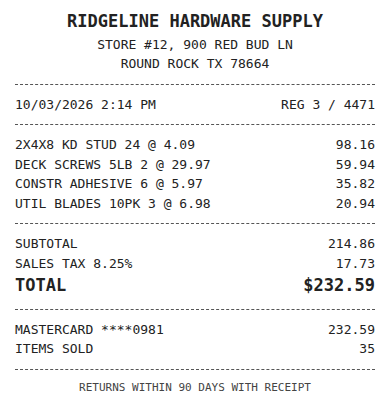
- Vendor
- Ridgeline Hardware Supply
- Date
- Oct 3, 2026
- Total
- $232.59
- Account
- Job Materials
- Class
- Field Ops
- Payment
- Card ending 0981

How much does Zoho Expense cost per user?
Zoho Expense Standard costs $3 per charged user per month billed yearly or $4 billed monthly. Premium costs $5 yearly or $6 monthly per charged user per month. Free costs $0 for up to 3 users. Only users who create expenses or expense reports are charged.
Zoho says you can add as many other users as you wish. Count expense creators before multiplying the rate by everyone who needs access. More than 500 users requires a custom quote. These are US dollar prices from Zoho's own pricing page at zoho.com/us/expense/pricing. Third-party reviews may quote older or different prices, so confirm on Zoho's page before buying.
Standard includes 200 autoscans per user per month, corporate cards and approvals. Its ERP and HRMS integrations are listed as an add-on. Premium raises autoscans to 1,000 per user per month and adds advanced approvals and policy controls. Choose Premium for a requirement you actually have. A higher scan allowance alone does not establish that it is the right plan for your company.
Does Zoho Expense integrate with QuickBooks Online?
Yes. Zoho Expense help documents describe integration with QuickBooks Online Simple Start, Essentials, Plus and Advanced. Approved expenses export after you configure the sync. The pricing page lists Accounting integrations on Free but does not name QuickBooks in any plan's feature list, so confirm plan eligibility directly with Zoho.
Reimbursable expenses export as a Bill per report with the employee as vendor. On Simple Start they export as Journals. Non-reimbursable expenses export as expenses, and new merchants become vendors. That distinction matters when a company-card charge already sits in QBO. Inspect the resulting entry and reconciliation work rather than assuming an integration will handle every existing transaction as you expect.
One Zoho Expense organization connects to one QBO company, and one QBO company connects to one Zoho Expense organization. A bookkeeper therefore needs an organization for each client company. Confirm the setup before building a client budget. Our Zoho Expense alternative comparison covers the difference between expense reporting and receipt bookkeeping. Test an approved employee claim and a company-paid receipt separately, since they follow different accounting routes.
Fwd: Your Lowe's receipt
Forwarded email, 2 min ago
IMG_4471.HEIC
Client link, 9 min ago
Invoice #88213 from Sunbelt Rentals
Gmail filter, 22 min ago
38 files from October folder
Batch upload, 1 hr ago
Is Zoho Expense free for small businesses?
Yes. Zoho Expense has a genuine $0 Free plan for a maximum of 3 users, with 20 receipt autoscans per user per month. It lists Accounting integrations. A tiny company can reasonably consider it, provided those limits cover its work and Zoho confirms the required QuickBooks Online connection.
The allowance belongs to each user. Do not assume one person can use another person's unused autoscans. Count the receipts each person submits in a busy month and compare that with the limit. Also establish which paid features you need before treating Free as an equivalent to Standard or Premium. Its existence is a real pricing option, not evidence that every small business can stay on it.
ReceiptQBO has no free plan. The receipt reader at the top of this page works without an account, so you can inspect a receipt before evaluating a subscription. That reader is a way to assess extraction and suggested coding. It does not turn Company into an ongoing free bookkeeping service.
Yearly cost examples for companies and a bookkeeping practice
Use the same billing commitment on both sides. For a hypothetical 5-person company where everyone creates expenses, Standard yearly costs 5 x $3 x 12 = $180/yr. Premium yearly costs 5 x $5 x 12 = $300/yr. ReceiptQBO Company yearly costs $24 x 12 = $288/yr. Standard is cheaper; the right choice still depends on reports, approvals and receipt bookkeeping.
For 15 card holders who each create expenses, Premium yearly costs 15 x $5 x 12 = $900/yr versus Company at $288/yr. Company includes up to 5 team members, so this comparison fits only if the remaining contributors submit receipts through forwarding or a phone upload link without a login. It does not provide 15 full team accounts. Company also limits documents to 300 a month and up to 40 a day.
For a hypothetical bookkeeper with 25 client companies averaging 4 charged users each, Standard yearly costs 25 x 4 x $36 = $3,600/yr. Each charged user costs $3 x 12 = $36 yearly, and there is one Zoho organization per client to manage. ReceiptQBO Bookkeeper yearly costs $149 x 12 = $1,788/yr for up to 25 companies and 2,500 pooled monthly documents. These examples compare subscriptions, without assigning a dollar saving to staff time.
Expense, ready to post
96%- Vendor
- Sunbelt Rentals
- Account
- 6600 Equipment Rental
- Class
- Field Ops
- Location
- Round Rock
- Project
- Lakeview Deck Project
- Billable
- Yes, to customer
Is Zoho Expense worth it for a bookkeeper with many clients?
Zoho Expense can be worth it when clients reimburse employees and need reports, approvals and policies. Its low per-user cost remains attractive across clients. For company-paid receipts, compare the total charged users and separate organizations with ReceiptQBO's practice subscription, then check document limits and the accounting work each client needs.
The practice example above assumes every client averages 4 charged users. Replace that assumption with each client's actual expense creators. Clients with fewer charged users may make Zoho cheaper. Clients that need employee claims still need an expense process, even if another product offers a lower receipt subscription. Keep those requirements in the budget rather than treating every client as the same workflow.
ReceiptQBO Bookkeeper costs $299 monthly or $149 a month billed yearly. Its shared review queue and Preparer and Reviewer roles support work across clients. The receipt scanner for bookkeepers guide explains that workflow. Larger practices can compare Firm at $899 monthly or $449 a month billed yearly for up to 100 companies and 10,000 pooled monthly documents. Count companies and volume together before choosing either practice plan.
What are you buying after the receipt is captured?
For company-card and vendor purchases, the bookkeeping task is to put the receipt against the right transaction with the right coding. ReceiptQBO uses each connected QBO company's own accounts, classes, locations, customers and projects. Vendor rules apply recurring accounting choices, while the review queue surfaces uncertain coding for a person to check.
ReceiptQBO checks for duplicates and looks for an existing bank or card transaction before posting. A matched receipt attaches to that transaction. If an approved document has no match, it creates an Expense or Bill with the image. Read how to match receipts to bank transactions and test a purchase already present in QBO, including its coding and attached image.
Zoho Expense is the better fit when the receipt supports an employee claim that needs approval and reimbursement. Teams mainly needing employee reimbursements and expense reports should evaluate expense management software around that process, including policies and approval responsibilities. ReceiptQBO does not produce employee expense reports or pay reimbursements. A bookkeeping review should not be mistaken for approval of money owed to an employee.
Receipt
Ridgeline Hardware
Oct 3, $232.59
Card ending 0981
Bank line in QuickBooks
RIDGELINE HARDWARE #12
Oct 4, $232.59
Matched, 2 day window
How to choose before paying for a year
Start with the purchases you need to process. Separate employee claims from company-paid spending, count charged Zoho users and list the QBO companies involved. Check which plan includes the QBO connection with Zoho. Then compare yearly totals alongside each plan's scan or document limits and the access your staff need.
Test representative receipts, including a vendor purchase with a charge already in the books and a receipt needing a class or customer. Check the resulting transaction, coding, image and corrections. For a practice, repeat this across clients with different account lists. Keep one tool responsible for posting each purchase during the evaluation so the comparison does not create duplicates.
Zoho is inexpensive and can be the right purchase for expense reporting. ReceiptQBO fits when the recurring job is coding company receipts and matching existing QBO transactions. Choose using the workflow you need and the bill that covers it. Do not remove a useful reimbursement process just because a company or practice subscription has a lower total in one example.
Zoho Expense and ReceiptQBO plan costs
| Plan | Price in USD | Autoscans or documents | Billing basis | QBO fit |
|---|---|---|---|---|
| Zoho Free | $0 | 20 autoscans per user monthly | Maximum 3 users | Accounting integrations listed, confirm QBO eligibility |
| Zoho Standard | $3 yearly or $4 monthly per user per month | 200 autoscans per user monthly | Per charged user | Expense reporting and approvals, confirm QBO eligibility |
| Zoho Premium | $5 yearly or $6 monthly per user per month | 1,000 autoscans per user monthly | Per charged user | Advanced approvals and policies, confirm QBO eligibility |
| ReceiptQBO Company | $49 monthly or $24 a month billed yearly | 300 documents monthly, up to 40 daily | Per company, up to 5 team members | QBO coding and matching without reimbursements |
| ReceiptQBO Bookkeeper | $299 monthly or $149 a month billed yearly | 2,500 pooled documents monthly, up to 300 daily | Per practice, up to 25 companies | QBO coding, matching and shared review |
Zoho yearly rates require yearly billing. Autoscans per user and pooled document allowances are different limits. Zoho pricing comes from its US pricing page, integration behavior from Zoho help documents. Confirm current prices and QBO plan eligibility before buying.
Zoho Expense pricing questions
Does Zoho charge every user?
Only users who create expenses or expense reports are charged. Zoho allows as many other users as you wish.
Which Zoho plan includes QuickBooks Online?
The pricing page does not name QuickBooks in any plan. Free lists Accounting integrations. Confirm QBO plan eligibility with Zoho.
Can one Zoho organization connect to several QBO companies?
No. One Zoho organization connects to one QBO company and vice versa. Bookkeepers need an organization per client company.
Is Zoho cheaper for a small team?
It can be. Standard yearly for 5 charged users costs $180, below ReceiptQBO Company at $288. Compare features and limits too.
How do reimbursable expenses reach QBO?
They export as a Bill per report with the employee as vendor, or Journals on Simple Start. Non-reimbursable expenses export as expenses.
Does ReceiptQBO replace employee expense reports?
No. ReceiptQBO handles QBO receipt and bill bookkeeping without employee reports or reimbursement payouts. Keep an expense tool for those needs.