October 23, 2026, 8 min read, by the ReceiptQBO team
Neat pricing and plans for QuickBooks Online users and bookkeepers
Neat costs $200 a year, about $16.67 a month, billed annually. VIP Service adds $50 a year and Automated Insights adds $150 a year, bringing the full stack to $400 a year per subscription. Neat sends expense data to QuickBooks Online with receipt and invoice images attached.
QuickBooks Online expense, ready to post
Confidence 93%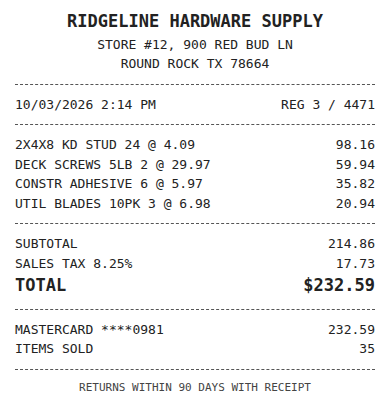
- Vendor
- Ridgeline Hardware Supply
- Date
- Oct 3, 2026
- Total
- $232.59
- Account
- Job Materials
- Class
- Field Ops
- Payment
- Card ending 0981

How much does Neat cost?
Neat costs $200 a year, billed annually, which works out to about $16.67 a month. Its pricing page shows annual prices only. Add VIP Service for $50 a year, Automated Insights for $150 a year, or both for a total of $400 a year per subscription.
These Neat receipts pricing figures come from Neat's public pricing page. The monthly equivalent helps compare subscriptions, but it is not a monthly payment offer. Budget the annual amount when you decide whether to renew or buy. Base Neat is $200, Neat with VIP Service is $250, and Neat with Automated Insights is $350.
For QBO bookkeeping, start with the work you actually need covered. Are you buying a place to file paper documents, a way to send expenses into QuickBooks Online, or a workflow for reviewing receipts across clients? An annual subscription can suit the first two needs without answering every question about the third.
Read the Neat alternative for QuickBooks Online comparison alongside the prices. It helps separate the filing job from the accounting decisions that follow. At renewal, compare the base subscription and each add-on separately so an optional purchase does not become part of your budget by habit.
What do VIP Service and Automated Insights add?
VIP Service adds $50 a year to Neat, and Automated Insights adds $150 a year. Both require a Neat subscription. Buying both brings the annual bill to $400. Treat these as optional purchases and confirm their current service scope before deciding whether either belongs in your bookkeeping budget.
The price labels establish the extra charges, but they do not by themselves establish what your team will use. Ask Neat to explain the current VIP Service entitlement and what Automated Insights provides for your account. Neither add-on should be treated as a substitute for checking which expense details reach QuickBooks Online.
Evaluate them against a specific task. If your question concerns getting documents into the ledger, demonstrate that transfer first. If you are considering an add-on for another need, ask to see that need addressed during the trial. Keep the base subscription in the comparison until you have a reason to add the optional charge.
Neat offers a free trial. TechRepublic reports that the trial lasts 14 days and requires a card, so confirm those terms at signup. Use the trial to check the QuickBooks connection and any add-on you are considering. Record which parts of the job still require a person before committing to the yearly bill.
Fwd: Your Lowe's receipt
Forwarded email, 2 min ago
IMG_4471.HEIC
Client link, 9 min ago
Invoice #88213 from Sunbelt Rentals
Gmail filter, 22 min ago
38 files from October folder
Batch upload, 1 hr ago
Does Neat work with QuickBooks Online?
Yes. Neat's integrations page lists QuickBooks Online and describes signing in to QuickBooks from inside Neat, mapping expenses to QuickBooks categories once, and sending expense data with receipt and invoice images attached. That establishes a QBO connection, while your trial should establish whether its workflow fits your books.
Check a real expense against the entry you would make yourself. Confirm the category and attached image in QuickBooks Online, then inspect what happens when the bank charge is already there. A listed integration answers whether the products connect. It does not answer every question about review, coding fields or matching existing charges.
Neat also lists H&R Block, Quicken, TurboTax, Outlook, Mailchimp and Google Contacts on its integrations page. For Neat users who rely on the TurboTax or H&R Block hand-off at tax time, the option to file your business taxes online is a separate filing decision to weigh alongside the document workflow. Do not assume that another filing service has the same Neat connection.
The integrations page does not list QuickBooks Desktop or Xero. Per third-party reviews, a QuickBooks Desktop connection was removed for some plans in 2024. That history is a reason to confirm your edition before buying. ReceiptQBO supports QuickBooks Online only, so it is not a replacement for a Desktop or Xero workflow.
What is the yearly cost for one business or 10 and 25 clients?
One business pays $200 a year for base Neat, below ReceiptQBO Company at $288 billed yearly. If each client needs a separate Neat subscription, 10 clients cost $2,000 a year and 25 cost $5,000. ReceiptQBO Bookkeeper costs $1,788 yearly for up to 25 companies, subject to pooled document limits.
For one company, the math is $24 multiplied by 12, or $288, for ReceiptQBO Company. Base Neat is $88 cheaper each year. Company includes 300 documents a month and up to 5 team members. Its monthly billing option is $49 a month. The lower Neat price matters when filing and its QBO transfer already cover the job.
For a bookkeeper, the base Neat calculations are 10 multiplied by $200, or $2,000, and 25 multiplied by $200, or $5,000. With both add-ons on every subscription, those totals become $4,000 and $10,000. These examples assume a separate subscription for each company. Confirm that arrangement with Neat before treating it as your quote.
ReceiptQBO Bookkeeper is $299 a month or $149 a month billed yearly. The yearly calculation is $149 multiplied by 12, or $1,788, with 2,500 documents a month pooled across up to 25 companies. Firm is $899 monthly or $449 a month billed yearly, covering up to 100 companies and 10,000 pooled monthly documents. Check company and volume limits together on the ReceiptQBO pricing page.
Expense, ready to post
96%- Vendor
- Sunbelt Rentals
- Account
- 6600 Equipment Rental
- Class
- Field Ops
- Location
- Round Rock
- Project
- Lakeview Deck Project
- Billable
- Yes, to customer
When is Neat the better choice?
Neat can be the better choice for one person with paper-heavy filing, a document archive and an established scanning habit. Its listed TurboTax, H&R Block and Quicken connections can also matter. At $200 a year for the base subscription, it costs less than ReceiptQBO Company on yearly billing.
Consider the owner who keeps receipts and other documents together and has a bookkeeper handle the ledger. A searchable archive may be the main purchase. If the current filing routine works and the QuickBooks Online transfer meets the bookkeeping need, a change of software needs a concrete benefit beyond a different way to upload receipts.
The same applies at tax time. If your process depends on a listed Neat connection to TurboTax, H&R Block or Quicken, check that hand-off before replacing the archive. ReceiptQBO focuses on receipts and vendor bills headed to QuickBooks Online. It should be assessed for that work rather than assumed to replace every document or tax workflow.
Keep the price comparison honest. Neat with both add-ons costs $400 a year, but that does not make $400 the entry price. If you only need base Neat, compare its $200 with Company at $288. A lower subscription and a familiar paper filing process can be good reasons for a single business to stay.
What does ReceiptQBO do differently for bookkeepers?
ReceiptQBO codes receipts to each QuickBooks Online company's own accounts, classes, locations and customers. It combines a review queue and per-client confidence thresholds with bank matching and missing receipt reminders. For a bookkeeper, the comparison is how much coding and follow-up remains after capture across the client list.
Each company brings its own lists from QuickBooks Online. Vendor rules can apply that company's accounting choices, and a reviewer's correction can become a rule for future receipts. The queue puts lower confidence items first, while a threshold controls which receipts can post automatically. The receipt scanner for bookkeepers page explains the practice workflow.
ReceiptQBO also matches receipts to bank transactions already in QuickBooks Online. Check that behavior with a receipt whose card charge is already present. The useful result is a receipt tied to the existing charge, with the accounting treatment you expect, rather than another entry to investigate during reconciliation.
Missing receipt reminders address the other side of the job. A weekly reminder lists charges still missing receipts and includes an upload link that requires no login. Those are concrete tasks to compare during evaluation. Do not turn them into assumed labor savings. Measure the review, corrections and follow-up your own team performs before deciding whether the subscription fits.
Receipt
Ridgeline Hardware
Oct 3, $232.59
Card ending 0981
Bank line in QuickBooks
RIDGELINE HARDWARE #12
Oct 4, $232.59
Matched, 2 day window
Is Neat worth it for QuickBooks Online users?
Neat is worth considering when its $200 annual base subscription covers your document filing and QuickBooks Online transfer needs. ReceiptQBO deserves a test when the recurring work is per-client coding, review and bank matching. Choose using the annual bill and the actual work left after a receipt reaches the ledger.
Use the same documents in each evaluation. Include an expense that needs a class or customer and a receipt whose charge already appears in QuickBooks Online. Check the category, image attachment and any corrections needed. For a practice, repeat that check across clients whose accounting lists differ so you see the work your reviewers will face.
If other prices are on your shortlist, compare Hubdoc pricing for QuickBooks Online and Dext pricing for QuickBooks bookkeepers on the same annual basis. A monthly equivalent attached to a yearly commitment should not be treated as a flexible monthly subscription. Keep client counts and document allowances beside every quote.
ReceiptQBO has no free plan. Anyone can try one receipt on the home page without an account to inspect the extracted details and suggested coding. Then weigh the wider workflow against your needs. For one business, base Neat starts cheaper. For multiple clients, use the subscription assumptions and pooled limits above before deciding which yearly bill makes sense.
Neat plans and yearly cost for QuickBooks users
| Option | Price | Yearly cost | What it covers |
|---|---|---|---|
| Neat | $200 billed annually | $200 | Base Neat subscription with QuickBooks Online integration |
| Neat + VIP Service | $200 base + $50 a year | $250 | Neat subscription and VIP Service add-on |
| Neat + Automated Insights | $200 base + $150 a year | $350 | Neat subscription and Automated Insights add-on |
| Neat + both | $200 base + $50 + $150 a year | $400 | Neat subscription with both optional add-ons |
| ReceiptQBO Company yearly | $24 a month billed yearly | $288 | 1 QBO company, 300 documents a month, up to 5 team members |
| ReceiptQBO Bookkeeper yearly | $149 a month billed yearly | $1,788 | Up to 25 QBO companies, 2,500 documents a month pooled |
US dollar prices. Neat pricing and integration facts come from its public pages. Both Neat add-ons require a Neat subscription. Multi-client examples assume a separate Neat subscription per company. ReceiptQBO yearly equivalents require yearly billing. Prices can change.
Neat pricing questions
Does Neat have a monthly plan?
Neat's public pricing page shows annual prices only. The $200 base subscription works out to about $16.67 a month, but that equivalent is not a monthly billing offer. Confirm current billing terms with Neat before buying. ReceiptQBO Company offers $49 monthly or $24 a month billed yearly.
Is there a free version of Neat?
Neat's pricing page offers a free trial alongside its $200 annual subscription, rather than listing a free plan. TechRepublic reports a 14 day trial with a card required. Confirm the current terms at signup. ReceiptQBO has no free plan, but anyone can try one receipt on the home page without an account.
Does Neat work with QuickBooks Desktop?
Neat's integrations page lists QuickBooks Online, not QuickBooks Desktop. Per third-party reviews, the Desktop connection was removed for some plans in 2024. Confirm support for your exact edition and plan directly with Neat. ReceiptQBO works only with QuickBooks Online and does not support QuickBooks Desktop.
Is Neat cheaper than Dext or Hubdoc?
Base Neat at $200 a year is cheaper than Dext business pricing from $25.21 a month billed yearly, or $302.52 a year, per Dext's pricing. Hubdoc's US pricing page lists $12 a month, or $144 over a year, below base Neat. Neat with both add-ons is $400 yearly. Compare plan coverage and company counts as well as price.
What is the best Neat alternative for QuickBooks Online?
ReceiptQBO is worth testing when you need coding to each QBO company's accounts, classes, locations and customers, plus review, bank matching and missing receipt reminders. Company costs $288 billed yearly, above base Neat at $200. Neat may fit better for paper-heavy filing, a document archive or its listed tax software connections.