November 19, 2026, 8 min read, by the ReceiptQBO team
Expensify vs QuickBooks receipt scanning cost for bookkeepers
QuickBooks Online's built-in receipt capture costs nothing extra but only stores and matches images, while Expensify Collect is listed at $5 per member per month and adds SmartScan and QBO sync. For a practice with 20 client companies and 4 people submitting at each, Expensify Collect is about $400 a month ($4,800 a year). A flat practice plan for receipt capture, such as ReceiptQBO Bookkeeper at $1,788 a year for 25 companies, changes that math when nobody needs reimbursements.
QuickBooks Online expense, ready to post
Confidence 93%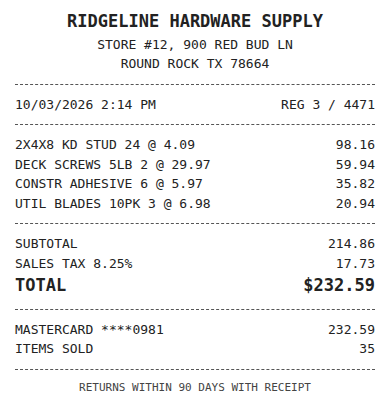
- Vendor
- Ridgeline Hardware Supply
- Date
- Oct 3, 2026
- Total
- $232.59
- Account
- Job Materials
- Class
- Field Ops
- Payment
- Card ending 0981

What is the difference between Expensify and QuickBooks for receipts?
They are not the same kind of tool. QuickBooks Online is the ledger. Its receipt capture lets you upload or photograph a document into the Receipts tab and match it to a bank transaction or create an expense from it, according to Intuit's receipts help article. It is included in the subscription you already pay.
Expensify is an expense management product. Employees snap receipts with SmartScan, group them into reports, a manager approves, and the approved expenses sync into QuickBooks Online. Reimbursement payouts, mileage and a corporate card sit around that workflow.
So the real question is not which one scans better. It is whether your people file expense claims, or whether you just need documents attached and coded in the books.
How much does Expensify cost compared with QuickBooks capture?
QuickBooks Online receipt capture has no separate fee. Expensify Collect is listed at $5 per member per month with no annual commitment and includes the QuickBooks Online connection, per Expensify's own pricing information. Control costs more per member and is aimed at larger teams. Plans change, so confirm on Expensify's pricing page before you quote a client.
Per member pricing is easy to underestimate in a practice, because the members are your clients' staff, not yours:
- 5 members at one client: $25 a month, $300 a year.
- 20 clients with 4 submitters each: 80 members, $400 a month, $4,800 a year.
- The same practice at 25 clients with 5 submitters: 125 members, $625 a month, $7,500 a year.
Those figures cover subscription only. Somebody still reviews coding, chases missing receipts and checks that the synced expenses did not double with the bank feed.
Fwd: Your Lowe's receipt
Forwarded email, 2 min ago
IMG_4471.HEIC
Client link, 9 min ago
Invoice #88213 from Sunbelt Rentals
Gmail filter, 22 min ago
38 files from October folder
Batch upload, 1 hr ago
What does QuickBooks Online receipt capture leave undone?
For a handful of receipts a month it may be all a small business needs. At practice volume the gaps show up fast:
- It does not read line items or code to your accounts by vendor rule, so each receipt is still a manual decision.
- It does not remind the person who paid when a card charge has no receipt.
- It has no queue that spans client companies, so you open each QBO file separately.
- Duplicate protection is limited, and a receipt emailed and then photographed can create two expenses.
That is the space between "free but manual" and "full expense management". Our receipt scanning software page goes into where native scanning stops.
Worked example for a practice with 20 clients
A practice looks after 20 contractors and service companies. Each has four people who pay with company cards and phones, and together they produce about 1,400 receipts a month. Nobody is reimbursed, because everything goes on company cards. The question is how to get documents into QuickBooks coded and matched.
Option A, QuickBooks capture only: $0 extra. Staff upload to the Receipts tab, the bookkeeper opens 20 files, keys fields and matches by hand. At two minutes a receipt that is about 47 hours a month of the bookkeeper's time.
Option B, Expensify Collect: $4,800 a year for 80 members. Employees file reports nobody needs to approve, and the expenses sync to QBO. The bookkeeper still reviews 20 clients one by one.
Option C, a flat practice plan: ReceiptQBO Bookkeeper at $149 a month billed yearly covers up to 25 client companies and 2,500 documents pooled, so $1,788 a year. Receipts come in by email forwarding or phone upload, are read and coded by vendor rule, attach to the bank charge already in QBO, and exceptions land in one review queue across all clients. ReceiptQBO does not do reimbursements, reports or cards.
Option C is $3,012 a year below Option B at this size, and it removes most of the keying in Option A. If even one client needs reimbursements and approvals, give that client Expensify and keep the rest on the flat plan.
Expense, ready to post
96%- Vendor
- Sunbelt Rentals
- Account
- 6600 Equipment Rental
- Class
- Field Ops
- Location
- Round Rock
- Project
- Lakeview Deck Project
- Billable
- Yes, to customer
When Expensify is the better choice
Choose Expensify when employees pay personally and expect reimbursement, when managers must approve spending before it posts, when you track mileage, or when you want the Expensify Card. Those are expense management jobs and ReceiptQBO does not try to cover them. Also choose it for clients who need Xero or QuickBooks Desktop, since ReceiptQBO supports QuickBooks Online only. Our Expensify alternative page lays out the trade-offs in more detail, and the Expensify pricing guide has the plan breakdown.
When QuickBooks capture alone is enough
A sole proprietor with 30 receipts a month, a single QBO company and one person doing the books can live in the Receipts tab. The cost of a tool is time saved, and at that volume there is little time to save. The line moves when you cross a few hundred documents a month, when more than one person pays, or when you manage several companies.
QuickBooks capture, Expensify and ReceiptQBO for a 20 client practice
| Topic | QuickBooks Online capture | Expensify Collect | ReceiptQBO Bookkeeper |
|---|---|---|---|
| Price | Included in QBO | $5 per member a month, listed | $149 a month billed yearly, 25 companies |
| Yearly cost, 20 clients, 80 members | $0 extra | About $4,800 | $1,788 |
| Line items and vendor-rule coding | No | Categories and rules in Expensify | Yes, to each company's own accounts and classes |
| Review queue across clients | No | Per workspace | One queue |
| Reimbursements and approvals | No | Yes | No |
| Best for | A few receipts a month | Teams filing expense claims | Practices that need documents coded and matched |
Expensify figures are the listed Collect price and may change. All prices are USD. Confirm current prices before buying.
Expensify and QuickBooks receipt questions
Is Expensify better than QuickBooks for receipts?
For expense claims, approvals and reimbursements, yes. For simply attaching receipts to transactions, QuickBooks Online capture is included in your plan and may be enough at low volume. Practices with many clients usually need coding rules and a shared queue on top.
How much does Expensify cost with QuickBooks Online?
Expensify Collect is listed at $5 per member per month and includes the QuickBooks Online connection. A client with five submitters pays about $300 a year, and a practice with 80 members across 20 clients pays about $4,800.
Does QuickBooks Online scan receipts?
Yes, it has a Receipts tab where you upload or photograph documents and match them to transactions or create expenses. It does not code by vendor rule, remind staff about missing receipts or work across client companies.
What is a cheaper alternative to Expensify for bookkeepers?
If nobody needs reimbursements, ReceiptQBO Bookkeeper is $149 a month billed yearly for 25 client companies and 2,500 documents pooled. It reads and codes receipts and matches them to bank charges in QuickBooks Online.