November 12, 2026, 7 min read, by the ReceiptQBO team
Ramp pricing for QuickBooks Online users and bookkeepers
Ramp has a free tier with QuickBooks Online sync, and a Plus tier reported at about $15 per user per month plus an unpublished platform fee. Most QuickBooks users never need Plus for the sync itself. The real cost question is different: Ramp only handles spend that runs through Ramp cards and bills, so receipts from personal cards, cash and other vendors still have to be read, coded and matched somewhere else.
QuickBooks Online expense, ready to post
Confidence 93%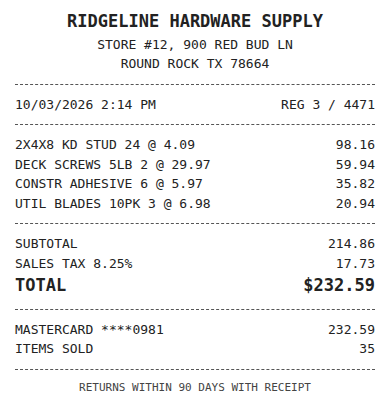
- Vendor
- Ridgeline Hardware Supply
- Date
- Oct 3, 2026
- Total
- $232.59
- Account
- Job Materials
- Class
- Field Ops
- Payment
- Card ending 0981

How much does Ramp cost?
Ramp lists three tiers. Free is $0 and, per the sources we checked, includes unlimited users, cards and a QuickBooks Online and Xero sync. Plus is reported at $15 per user per month billed monthly, or about $12 on annual billing, and it adds a platform fee based on team size that Ramp does not print on its site. Enterprise is quoted by sales.
Third-party sites disagree on details, and one still shows an older $7 figure, so treat every number below as a reported price. Ramp's own pricing page and its Plus billing policy are the sources to confirm before you sign.
What does Ramp Plus cost for 25 people?
At $15 per user per month, 25 users is $375 a month, or $4,500 a year, before the platform fee. On annual billing at roughly $12, it is about $300 a month, $3,600 a year. Plus mostly matters for multi-entity setups, NetSuite or Sage Intacct, and advanced approval rules.
A QuickBooks Online practice usually sits on the free tier, so the number to watch is not the Ramp license. It is the time spent on everything Ramp does not see.
Fwd: Your Lowe's receipt
Forwarded email, 2 min ago
IMG_4471.HEIC
Client link, 9 min ago
Invoice #88213 from Sunbelt Rentals
Gmail filter, 22 min ago
38 files from October folder
Batch upload, 1 hr ago
Does Ramp work with QuickBooks Online?
Yes. Ramp syncs transactions, coding and receipts to QuickBooks Online, and the sync is part of the free tier. What it syncs is Ramp activity: card swipes, reimbursements and bills paid through Ramp. A client who also pays suppliers by check, uses a personal card for some purchases or hands over a folder of paper receipts has spending Ramp never sees.
That gap is where bookkeepers lose hours. The receipt has to be read, coded to the client's accounts, and matched to the bank or card line before it posts. Our guides on matching receipts to bank transactions and vendor rules for receipt coding cover how that works.
What does a QuickBooks practice pay for the rest of the receipts?
ReceiptQBO Bookkeeper on yearly billing is $149 x 12 = $1,788 a year for up to 25 client companies and 2,500 pooled documents a month. One company on yearly billing is $24 x 12 = $288 a year. Each receipt is coded from the connected company's own accounts, classes and customers, and the app looks for the matching bank or card transaction before posting.
You can run both. Ramp for the clients that adopt its cards, ReceiptQBO for everything arriving by photo, forwarded email or upload link. For other vendors the same math is in the Dext pricing guide and the Expensify pricing guide. Practices that explain these cost changes to clients in newsletters often reuse one post across channels with a tool like Adapter.
Expense, ready to post
96%- Vendor
- Sunbelt Rentals
- Account
- 6600 Equipment Rental
- Class
- Field Ops
- Location
- Round Rock
- Project
- Lakeview Deck Project
- Billable
- Yes, to customer
When is Ramp the right choice?
When the client is willing to move company spend onto Ramp cards and wants spend controls, approvals and bill pay in one place. Then free QuickBooks sync is hard to beat. It is the wrong fit when the problem is a pile of receipts from existing cards and cash, because you cannot sync what Ramp never processed.
Ramp and ReceiptQBO side by side
| Plan | Price in USD | Billing basis | Covers | Best for |
|---|---|---|---|---|
| Ramp Free | $0 | Unlimited users | Ramp cards and bills, QBO sync | Clients moving spend onto Ramp |
| Ramp Plus | About $15 per user a month, about $12 annual, plus platform fee | Per user | Multi-entity, ERP, advanced rules | Larger teams with controls |
| ReceiptQBO Company | $49 monthly or $24 a month billed yearly | Per company, up to 5 team members | Any receipt, coded and matched in QBO | One QBO company |
| ReceiptQBO Bookkeeper | $299 monthly or $149 a month billed yearly | Per practice, up to 25 companies | Any receipt across clients, shared review | QBO practices |
Ramp figures come from third-party reports and may be out of date. Confirm with Ramp before buying.
Ramp pricing questions
How much is Ramp per month?
Ramp Free is $0. Ramp Plus is reported at about $15 per user per month, or about $12 billed annually, plus a platform fee Ramp does not publish.
Is Ramp free for QuickBooks Online?
Per the sources we checked, the QuickBooks Online sync is included in the free tier, so Plus is not required for it.
Does Ramp read receipts from cards it does not issue?
Ramp matches receipts to Ramp card and bill transactions. Spending on other cards, checks or cash needs a separate receipt workflow.
Is ReceiptQBO cheaper than Ramp Plus?
ReceiptQBO is $1,788 a year for up to 25 companies. Ramp Plus for 25 users is about $3,600 to $4,500 a year before the platform fee, but the two do different jobs.
Can I try ReceiptQBO before paying?
The receipt reader at the top of this page works without an account, so you can read a real receipt before you subscribe.