November 13, 2026, 8 min read, by the ReceiptQBO team
Bill.com pricing for QuickBooks Online users and bookkeepers
Bill.com lists Essentials at $49, Team at $65 and Corporate at $89 per user per month, plus $0.59 per ACH payment and $1.99 per mailed check. Only Team and above get the automatic two-way QuickBooks Online sync; Essentials syncs by CSV file. These plans cover paying and collecting vendor and customer invoices. They do not read the receipts clients hand you from cards, cash and mileage, so a practice usually pays for Bill.com and still codes receipts by hand.
QuickBooks Online expense, ready to post
Confidence 93%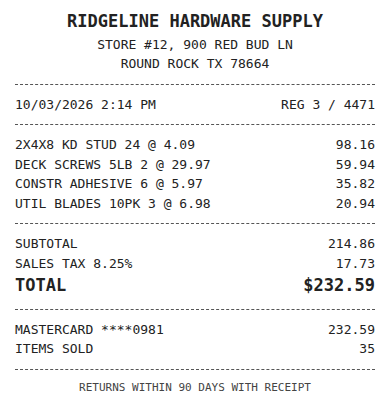
- Vendor
- Ridgeline Hardware Supply
- Date
- Oct 3, 2026
- Total
- $232.59
- Account
- Job Materials
- Class
- Field Ops
- Payment
- Card ending 0981

How much does Bill.com cost per month?
Bill.com's accounts payable and receivable pricing page lists four tiers. Essentials is $49 per user per month, Team is $65, Corporate is $89, and Enterprise is a custom quote. The page shows a plain "user/month" figure and does not say on the page whether it assumes annual billing, so confirm that on the Bill.com pricing page before you sign.
There is also a separate Spend and Expense product listed at $0 per user per month, with AI receipt capture, matching and transaction coding. That is a card and expense product, not part of the per-seat AP and AR plans, and it works best when the company moves spend onto Bill cards.
Which Bill.com plan syncs with QuickBooks Online?
Team, Corporate and Enterprise list an automatic two-way sync with QuickBooks Online. Essentials lists a manual integration through CSV import and export. If a client expects bills and payments to flow into QuickBooks without anyone touching a file, Essentials is the wrong plan and the real starting price is $65 per user.
Custom approval policies and multi-entity support start at Corporate, $89 per user. A bookkeeper who wants those rules for a client lands at the top of the three published tiers.
Fwd: Your Lowe's receipt
Forwarded email, 2 min ago
IMG_4471.HEIC
Client link, 9 min ago
Invoice #88213 from Sunbelt Rentals
Gmail filter, 22 min ago
38 files from October folder
Batch upload, 1 hr ago
What are the Bill.com transaction fees?
Subscription is only part of the bill. The fee table on the pricing page lists $0.59 per ACH payment, $1.99 per check that Bill mails, free virtual cards, and 1.0% for instant payment (minimum $9.99, maximum $100). Card payments are listed at 2.9%, though the table is easy to misread about which rows that applies to, so check it for the payment type you use.
A client sending 60 ACH payments a month adds about $35 in fees. Ten mailed checks add about $20. Small numbers, but they stack on top of the seats.
What does Bill.com cost for a small business in a real month?
Take a client with three people in the payables workflow: an owner who approves, a bookkeeper and an office manager. On Team that is 3 x $65 = $195 a month, or $2,340 a year, before fees. Add 60 ACH payments at $0.59 and 4 checks at $1.99 and the month comes to about $238. On Corporate, for custom approvals, the same three seats cost 3 x $89 = $267 a month, $3,204 a year.
Those prices are reasonable if the client has real vendor invoices to approve and pay. They are not a receipt solution. The photographed lunch, the Home Depot run and the subscription charged to a personal card never show up in a vendor bill.
Expense, ready to post
96%- Vendor
- Sunbelt Rentals
- Account
- 6600 Equipment Rental
- Class
- Field Ops
- Location
- Round Rock
- Project
- Lakeview Deck Project
- Billable
- Yes, to customer
Does Bill.com handle receipts for QuickBooks Online?
Not in the AP and AR plans. Bill.com's receipt capture sits in its Spend and Expense product, which pairs receipts with Bill card and reimbursement activity. A client who keeps paying with an existing business card, a personal card or cash gets no help there, and the bookkeeper still opens each receipt, reads the vendor and total, picks the account and finds the bank line.
That is the gap ReceiptQBO fills. It reads each receipt, codes it from the connected company's own accounts, classes and customers, and looks for the matching bank or card transaction before posting. See how this works in the guide to matching receipts to bank transactions, or compare the same per-client math in the Ramp pricing guide.
What does a QuickBooks practice pay for receipts instead?
ReceiptQBO Bookkeeper on yearly billing is $149 x 12 = $1,788 a year for up to 25 client companies and 2,500 pooled documents a month. One company on yearly billing is $24 x 12 = $288 a year. Compare that with a single Bill.com Team seat at 12 x $65 = $780 a year: the receipt workflow for a whole practice costs less than two seats of payables software, because it is priced per practice, not per user.
Most practices run both. Bill.com for clients with real vendor payables, ReceiptQBO for the pile of receipts arriving by photo, forwarded email or upload link. If you also run a client-facing site and want visitors to get answers without a call, a tool like Inchat handles that part. For other vendors in the same comparison, see the Dext alternative page.
Receipt
Ridgeline Hardware
Oct 3, $232.59
Card ending 0981
Bank line in QuickBooks
RIDGELINE HARDWARE #12
Oct 4, $232.59
Matched, 2 day window
When is Bill.com the right choice?
When the client pays many vendor invoices by ACH or check, needs approvals before money leaves, and is happy to pay per seat for it. It is the wrong buy if the real pain is receipts, because no tier on the AP and AR price list reads them. Buy the tool that matches the stack of paper on the desk.
Bill.com and ReceiptQBO side by side
| Plan | Price in USD | Billing basis | QuickBooks Online | Best for |
|---|---|---|---|---|
| Bill.com Essentials | $49 per user a month | Per user | CSV import and export | Light payables, manual sync |
| Bill.com Team | $65 per user a month | Per user | Automatic two-way sync | Small teams paying vendors |
| Bill.com Corporate | $89 per user a month | Per user | Automatic two-way sync, custom approvals | Teams needing approval rules |
| ReceiptQBO Company | $49 monthly or $24 a month billed yearly | Per company, up to 5 team members | Receipts coded and matched in QBO | One QBO company |
| ReceiptQBO Bookkeeper | $299 monthly or $149 a month billed yearly | Per practice, up to 25 companies | Receipts across clients, shared review | QBO practices |
Bill.com figures come from its public pricing page and may change. Transaction fees are extra. Confirm with Bill.com before buying.
Bill.com pricing questions
How much is Bill.com per month?
Bill.com lists Essentials at $49, Team at $65 and Corporate at $89 per user per month, with Enterprise on a custom quote. Payment fees such as $0.59 per ACH are extra.
Does Bill.com sync with QuickBooks Online?
Team, Corporate and Enterprise list an automatic two-way sync. Essentials uses a manual CSV import and export.
Does Bill.com scan receipts?
Receipt capture is part of its separate Spend and Expense product, not the per-user AP and AR plans.
Is ReceiptQBO a Bill.com replacement?
No. ReceiptQBO reads and codes receipts and bills for QuickBooks Online. It does not pay vendors, so many practices use both.
Can I try ReceiptQBO before paying?
The receipt reader at the top of this page works without an account, so you can read a real receipt before you subscribe.