November 20, 2026, 8 min read, by the ReceiptQBO team
Best way to scan receipts into QuickBooks, four methods compared by monthly cost
The best way to scan receipts into QuickBooks depends on how many receipts you handle a month. Under about 50 a month, the QuickBooks mobile app is enough. Past a few hundred, or with more than one client company, manual keying costs more than a flat-price receipt tool. For a practice with 20 clients and 1,400 documents a month, keying runs about 47 hours, while a $149 a month practice plan leaves a review queue of exceptions.
QuickBooks Online expense, ready to post
Confidence 93%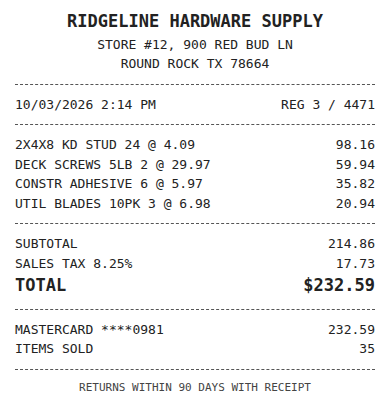
- Vendor
- Ridgeline Hardware Supply
- Date
- Oct 3, 2026
- Total
- $232.59
- Account
- Job Materials
- Class
- Field Ops
- Payment
- Card ending 0981

What are the ways to scan receipts into QuickBooks?
There are four realistic methods. You photograph receipts in the QuickBooks mobile app. You scan them on a flatbed or sheet-fed scanner and upload the files. You use a per-user expense app that syncs approved expenses. Or you use a receipt inbox built for QuickBooks Online that reads and codes each document. They solve different problems, so the best one depends on volume, on how many companies you keep, and on who touches the receipts first.
Method 1, the QuickBooks mobile app
Cost is zero beyond your subscription. You take a photo, it lands in the Receipts tab, and you match it to a bank transaction or create an expense, as Intuit describes in its receipts help article. Time cost is the typing: roughly two minutes a document once you count opening, checking and coding it.
It works well for one company and under about 50 receipts a month. It strains when several people submit, because nothing enforces how a vendor is coded, and it does not remind anyone about charges with no receipt.
Fwd: Your Lowe's receipt
Forwarded email, 2 min ago
IMG_4471.HEIC
Client link, 9 min ago
Invoice #88213 from Sunbelt Rentals
Gmail filter, 22 min ago
38 files from October folder
Batch upload, 1 hr ago
Method 2, a scanner and a folder
A desktop scanner costs a one-time $150 to $400, and the files go into a client folder. This is the method most practices drift into without choosing it. It is fine for archiving, but the folder is not the books. Someone still keys every field, attaches the file, and checks for duplicates by memory. It adds a handling step, so total time per document is often above two minutes, not below.
Method 3, a per-user expense app
Apps such as Expensify charge per member per month and add approvals, reimbursements and a card. If your clients file expense claims, that is the right tool. If they only need receipts attached and coded, you pay for every submitter. Our Expensify against QuickBooks receipt scanning cost guide runs the numbers, and a 20 client practice with 80 members lands near $4,800 a year at the listed $5 per member.
Expense, ready to post
96%- Vendor
- Sunbelt Rentals
- Account
- 6600 Equipment Rental
- Class
- Field Ops
- Location
- Round Rock
- Project
- Lakeview Deck Project
- Billable
- Yes, to customer
Method 4, a receipt inbox built for QuickBooks Online
This is where ReceiptQBO sits, and we make it, so weigh the section with that in mind. Clients upload with a no-login link from a phone browser. Each document is read for vendor, date, subtotal, tax, total and line items, your vendor rules assign the account, class and customer, and a review queue shows only low confidence reads and possible duplicates. The work is then exported for QuickBooks Online. Pricing is flat. Company is $49 a month or $24 a month billed yearly, and Bookkeeper is $149 a month billed yearly for 25 companies and 2,500 documents pooled.
It is built for QuickBooks Online only, so it does not suit Desktop or Xero shops. See QuickBooks receipt automation for the full workflow.
The math for a practice with 20 clients
Assume 1,400 receipts and bills a month across 20 small clients. At two minutes each, the mobile app or the scanner and folder costs about 47 hours of keying a month. At $50 an hour, that is $2,350 of time. A per-user expense app at 80 members is about $400 a month before any keying saved. The flat practice plan is $149 a month billed yearly, and the work that remains is the exceptions queue, not 1,400 manual entries.
The point is not that the tool does all of it. Rules cover recurring vendors, the first month takes effort to set up, and a share of documents will always need a human look. Test it with one client month before deciding. Practices that also market themselves online often pair this with a domain, backlink and keyword data service, and the same rule applies there, price it against the hours it saves.
Receipt
Ridgeline Hardware
Oct 3, $232.59
Card ending 0981
Bank line in QuickBooks
RIDGELINE HARDWARE #12
Oct 4, $232.59
Matched, 2 day window
Which method should you pick
Use the mobile app if you have one company and light volume. Use a per-user expense app if your people file claims and need approvals. Use a receipt inbox for QuickBooks Online if you are a bookkeeper with several clients, or a business with several hundred documents a month and nobody who wants to key them. The receipt scanner for bookkeepers page shows the practice setup, and our best receipt scanner apps for QuickBooks Online roundup compares named alternatives.
Four ways to scan receipts into QuickBooks for a 20 client practice
| Method | Cash cost | Keying time | Best for |
|---|---|---|---|
| QuickBooks mobile app | Included | About 47 hours a month | One company, under 50 receipts |
| Scanner and folder | $150 to $400 once | 47 hours or more | Archiving paper |
| Per-user expense app | About $400 a month at $5 per member | Reduced, plus approvals | Teams filing expense claims |
| ReceiptQBO Bookkeeper | $149 a month billed yearly | Exceptions only | Practices with many clients |
Two minutes a document and $50 an hour are working assumptions, not measurements. Expensify is the listed Collect price. All prices are USD.
Questions about scanning receipts into QuickBooks
What is the best way to scan receipts into QuickBooks?
For one company with light volume, the QuickBooks mobile app. For a bookkeeper with many clients, a receipt tool that reads fields, codes by vendor rule and queues exceptions saves the most time.
Can QuickBooks Online scan receipts automatically?
It captures receipt images and lets you match them to transactions or create expenses. It does not apply vendor coding rules to each receipt or remind staff about missing ones.
How long does it take to enter a receipt into QuickBooks by hand?
About two minutes once you open, read, code and attach it. At 1,400 documents a month that is roughly 47 hours.
How much does ReceiptQBO cost?
Company is $49 a month or $24 billed yearly for 300 documents. Bookkeeper is $149 a month billed yearly for 25 client companies and 2,500 documents pooled.