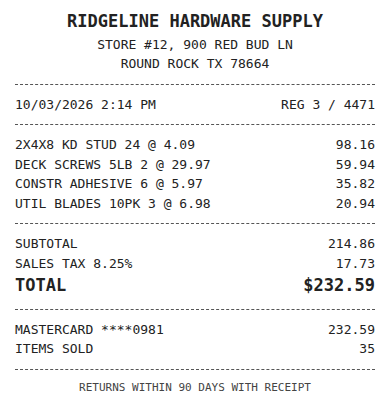

What does the QuickBooks app do with receipts?
QuickBooks Online has receipt capture built in. In the mobile app you photograph a receipt, it lands in the Receipts tab, and you either match it to a bank transaction that is already there or create an expense from it. Intuit describes the workflow in its receipts help article. It comes with your subscription, so for a sole proprietor with a few dozen receipts a month it is a sensible place to start.
The limit shows up with volume and with more than one person. The app works inside one QuickBooks company at a time, it does not apply your coding rules to a receipt before you open it, and it does not tell a client that three card charges still have no receipt behind them.
Where a bookkeeper outgrows the app
Four things push a practice past the built-in app, usually in this order.
- Typing. Someone still reads the vendor, date, tax and total from the image and keys them in.
- Consistency. The same vendor gets coded to Supplies by one person and Job Materials by another, and nobody notices until year end.
- Many companies. A bookkeeper with 20 clients opens 20 separate Receipts tabs to see what is waiting.
- Missing paper. Reconciliation turns up card charges with no receipt, and the chase happens by email, one client at a time.
None of these is a flaw in QuickBooks. They are the work a receipt app on top of QuickBooks is meant to take over.
Fwd: Your Lowe's receipt
Forwarded email, 2 min ago
IMG_4471.HEIC
Client link, 9 min ago
Invoice #88213 from Sunbelt Rentals
Gmail filter, 22 min ago
38 files from October folder
Batch upload, 1 hr ago
What ReceiptQBO adds on top of QuickBooks
ReceiptQBO is a receipt and bill inbox for QuickBooks Online. Each client company gets a no-login upload link that works in a phone browser, so there is nothing for staff to install. Every document is read for vendor, date, subtotal, tax, total and line items. Your vendor rules assign the account, class and customer, and a rule always wins over the AI guess. Anything with low confidence or a possible duplicate waits in a review queue that spans all of your clients, and the clean ones go straight through.
Charges that already sit in the bank or card feed are matched by amount and a date window instead of creating a second expense, and a weekly email with the upload link goes to clients who still owe receipts. When you are done reviewing, you export the work for QuickBooks Online as a CSV or XLSX file. The how it works page walks through each screen.
A worked example with 12 clients
Take a bookkeeper with 12 small clients who together send about 600 receipts and supplier bills a month. With the built-in app, each document is opened, read and keyed, at roughly two minutes each. That is about 20 hours a month of typing before any chasing for missing paper.
The same practice on ReceiptQBO Bookkeeper pays $1,788 a year for up to 25 companies and 2,500 documents pooled across them. Recurring vendors pass on their rules, and the bookkeeper opens one queue of exceptions instead of 12 tabs. If an hour of your time bills at $60, the keying alone is worth about $1,200 a month, against $149. The numbers will differ for your clients, but the comparison is worth doing with your own volume and your own rate. The receipt scanner for bookkeepers page covers the practice setup.
Expense, ready to post
96%- Vendor
- Sunbelt Rentals
- Account
- 6600 Equipment Rental
- Class
- Field Ops
- Location
- Round Rock
- Project
- Lakeview Deck Project
- Billable
- Yes, to customer
How it compares with consumer receipt apps
Receipt apps for personal budgets and single-user expense reports save an image and give you a list. They rarely know your chart of accounts, your classes or your customers, so the accounting step is still manual. Per-user expense tools bring approvals and reimbursements you may not need, and charge for every submitter. If you are weighing those, the Expensify against QuickBooks receipt scanning cost guide shows the math for a 20 client practice.
Who should skip it
If you keep one company and photograph a handful of receipts a month, use the QuickBooks app. If you run QuickBooks Desktop or Xero, ReceiptQBO is not the right fit, because it is built only for QuickBooks Online. For everyone between those two cases, a month of real receipts is the fastest test.
QuickBooks mobile app and ReceiptQBO for receipts
| Topic | QuickBooks mobile app | ReceiptQBO |
|---|---|---|
| Capture from a phone | Camera in the QuickBooks app | No-login upload link in the phone browser |
| Reads vendor, tax, total, line items | Basic details | Yes, with a confidence score |
| Coding | Chosen by hand | Vendor rules for account, class and customer |
| Many client companies | One company at a time | One review queue across all clients |
| Duplicates | Found at reconciliation | Held for review before export |
| Missing receipt reminders | Not built in | Weekly email with the upload link |
| Price | Included in QuickBooks | $49 a month, $24 billed yearly, or $149 for 25 clients billed yearly |
All prices are USD and match the pricing page. QuickBooks Online only.
Get receipts out of the phone and into the books
- Send the upload link. Each client gets a no-login link that opens the camera in the phone browser.
- Set vendor rules. Map your regular vendors to accounts, classes and customers once.
- Clear the queue and export. Review the exceptions, then export the file for QuickBooks Online.