November 14, 2026, 8 min read, by the ReceiptQBO team
Emburse Spend (Abacus) pricing for QuickBooks Online users
Emburse does not publish a current price for Emburse Spend, the product formerly called Abacus. Older third-party listings show about $9 per active user per month for a basic tier, with higher tiers and annual contracts by quote. For a bookkeeper the useful number is not the seat price, it is how many active submitters you will end up paying for across clients.
QuickBooks Online expense, ready to post
Confidence 93%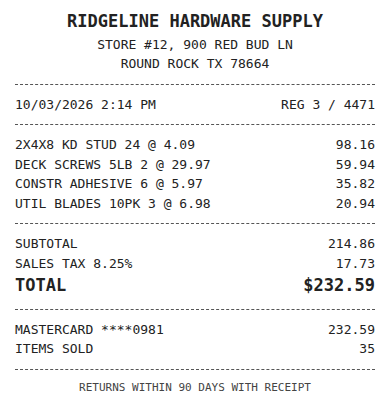
- Vendor
- Ridgeline Hardware Supply
- Date
- Oct 3, 2026
- Total
- $232.59
- Account
- Job Materials
- Class
- Field Ops
- Payment
- Card ending 0981

How much does Emburse Spend (Abacus) cost?
There is no public price table on Emburse's site for Emburse Spend. Software review sites disagree. TrustRadius lists a starting point of $9 per active user per month, G2 shows entry figures such as $120 for 15 users a month, and several sites now say pricing is custom. Treat all of these as old and ask for a written quote. Read the vendor page at emburse.com for the current offer and the sales contact.
"Active user" matters. It usually means a person who submitted or approved something in the month, so the bill moves with how many people use the system, not how many accounts exist.
What does Emburse Spend include for QuickBooks Online users?
Third-party listings describe receipt capture in a mobile app, expense reports, approvals, corporate cards and an accounting sync to QuickBooks Online, QuickBooks Desktop, Xero and Sage Intacct. Which sync is in which tier is not consistent across sources, so ask which plan includes QuickBooks Online and whether classes and locations carry over.
It is an expense management product. That is a good fit for a company where employees spend and managers approve, and an expensive way to get a bookkeeper's receipt pile into a ledger.
Fwd: Your Lowe's receipt
Forwarded email, 2 min ago
IMG_4471.HEIC
Client link, 9 min ago
Invoice #88213 from Sunbelt Rentals
Gmail filter, 22 min ago
38 files from October folder
Batch upload, 1 hr ago
What does Emburse Spend cost for a real practice?
Suppose you take on 25 client companies and each has 3 people who photograph receipts. That is 75 active users. At the older $9 figure, 75 x $9 = $675 a month, or $8,100 a year, before any minimum, onboarding fee or higher tier. If only 10 of those clients use it, 30 users cost $270 a month, $3,240 a year.
Compare that with ReceiptQBO Bookkeeper on yearly billing: $149 x 12 = $1,788 a year for up to 25 client companies and 2,500 pooled documents a month, whether a client has 1 submitter or 10. One company on yearly billing is $24 x 12 = $288 a year. The model is per practice, not per person, so adding a client's office manager costs nothing.
What should you ask Emburse before signing?
Four questions settle most of it. What is the price per active user at my volume, in writing. Is there a minimum user count or annual commitment. Which tier includes the QuickBooks Online sync. Can one account hold several unrelated client companies, or does each need its own tenant. The last one decides whether a practice can use the product at all.
Expense, ready to post
96%- Vendor
- Sunbelt Rentals
- Account
- 6600 Equipment Rental
- Class
- Field Ops
- Location
- Round Rock
- Project
- Lakeview Deck Project
- Billable
- Yes, to customer
Where do receipts still fall through?
Expense tools capture receipts that go through their app and their cards. A client who pays with a personal card, cash or an existing business card and emails a photo still leaves the bookkeeper opening each file, reading the vendor and total, choosing the account and finding the bank line.
ReceiptQBO is built for that gap. It reads each receipt, codes it from the connected company's own accounts, classes and customers, and looks for the matching bank or card transaction. Details are on the Emburse alternative page, and the receipts-to-bank logic is in the guide to matching receipts to bank transactions. If you also screen candidates for a growing practice, an AI recruiter that books interviews can cut the admin there too.
When is Emburse the right choice?
When a client needs employee expense reports, approval rules, corporate cards or reimbursements and will pay per user for them. It is the wrong buy when the real pain is a monthly stack of receipts that must be coded and matched in QuickBooks Online. Buy the tool that matches the problem on the desk. Our Expensify pricing guide runs the same math for another platform.
Emburse Spend and ReceiptQBO cost for a 25 client practice
| Option | Price in USD | Billing basis | Yearly cost for 25 clients | Best for |
|---|---|---|---|---|
| Emburse Spend (listing figure) | About $9 per active user a month | Per active user, custom quote | 75 users x $9 x 12 = $8,100 | Companies with employee spend |
| ReceiptQBO Company | $49 monthly or $24 a month billed yearly | Per company, up to 5 team members | 25 x $288 = $7,200 | One QBO company |
| ReceiptQBO Bookkeeper | $299 monthly or $149 a month billed yearly | Per practice, up to 25 companies | $1,788 | QBO practices |
Emburse figures come from third-party listings and may be out of date. Confirm with Emburse before buying. All prices are USD.
Emburse Spend pricing questions
How much is Emburse Spend per month?
Emburse does not publish a current price. Older listings show about $9 per active user per month, and newer ones say custom quote.
What happened to Abacus?
Abacus was acquired by Emburse and the product is now called Emburse Spend, formerly Abacus.
Does Emburse Spend integrate with QuickBooks Online?
Listings report a QuickBooks Online sync, but which plan includes it varies by source, so confirm before you buy.
Is there a flat price for a bookkeeping practice?
ReceiptQBO Bookkeeper is $149 a month billed yearly for up to 25 client companies, regardless of how many people submit receipts.
Can I try ReceiptQBO before paying?
The receipt reader at the top of this page works without an account, so you can read a real receipt before you subscribe.